Sweet Order: Sort It All!
Drag scattered objects into their matching boxes, uncover hidden pieces, and complete each sorting order.
- Session
- 3–10 min
- Controls
- Drag objects with the mouse or a finger
- Best for
- Relaxed
Clear the clutter
Sweet Order: Sort It All!
Drag objects with the mouse or a finger
Play loads a game hosted by GamePix that may show ads and use cookies.
Provided by GamePix. Ads and cookies may load only after you press Play. Read the GamePix Privacy and Cookie Policy.
Read the labels and example pictures on the category boxes before moving an object.
How to play
How to Play Sweet Order: Sort It All!
Drag each visible object with a mouse or finger, release it over the correct category box at the top, and uncover and sort the full tabletop to finish the order.
- 01
Read every box label and examine its example image before moving an item. Use the category meaning as the main rule rather than relying only on color or shape.
- 02
Choose an object whose identity is fully visible. Press it with the mouse or your finger, drag it toward the correct box, and release it over that target.
- 03
Confirm the placement through the order counter and the remaining category count. A registered item leaves the tabletop and the completed total increases.
- 04
Rescan the space that the object uncovered. Overlapping pieces may hide part or all of another item, so each correct sort can create a new available choice.
- 05
Continue one object at a time, keeping Coins separate from the star-based progress shown elsewhere in the interface. Treat each display as a distinct resource or goal.
- 06
If the table becomes hard to read, use only the assistance controls the current screen offers, such as Spread out or Hint, then return to checking labels and sorting the remaining objects.
About the game
Sort a cluttered tabletop one clear choice at a time
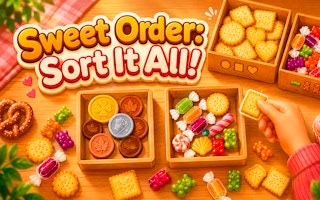
Sweet Order: Sort It All! is a drag-and-drop sorting puzzle built around a messy tabletop. Objects are scattered and sometimes overlap, while labeled boxes at the top show the categories needed for the current order. Pick up one visible object, drag it to the matching box, and release it to register the choice.
The first sorting screen introduces Coins and Treats. The box headers include example images, giving you both a word label and a visual clue. Copper coins belong in Coins, while sweet food such as a cupcake belongs in Treats. A correct placement removes the object from the table and advances the order count, gradually revealing anything that was hidden beneath it.
Success comes from observation rather than speed. Read the category label, identify the whole object, and check the counter after releasing it. Clearing a top layer can expose a candy or other piece that was not selectable before. Sort every item correctly to complete the level and move through the larger sequence of orders.
Controls
Controls for Sweet Order: Sort It All!
- Mouse drag
- Pick up an object and move it toward a category box on desktop.
- Finger drag
- Pick up and move an object on a mobile or tablet screen.
- Release over a box
- Submit the object to that category.
- On-screen assistance
- Use an available Spread out or Hint control when needed.
Useful strategy
Read the box label, then clear the visible top layer
- Use the label and example picture together. A shared color does not make two objects members of the same category.
- Start with objects you can identify completely. Removing obvious top pieces opens the table and reduces guesses about partly covered shapes.
- Release near the center of the intended box. A deliberate drop makes the target clear and avoids slipping toward the neighboring category.
- Check the order count after every release. The counter is the quickest confirmation that the item registered and the tabletop is ready for the next choice.
- Rescan newly exposed areas immediately. A hidden treat may become obvious as soon as the coin or other object covering it disappears.
- Keep category objects, order progress, and stars conceptually separate. Coins on the table are sorting pieces; the star display belongs to broader progress and rewards.
Classify by the box label instead of surface color
Each box defines a category through its title and sample image. Read both before sorting. A copper coin is identified by what it is, not simply by its brown color; a cupcake belongs with treats because it is sweet food, not because it shares a wrapper color with another object. Category meaning remains useful even when two pieces look visually similar.
Compare uncertain items with the clearest examples already on screen. If one box represents Coins and another Treats, ask which noun naturally describes the object. This short verbal check is more reliable than guessing from size, position, or the box closest to the item.
Recheck the headers whenever the order changes or you return after a pause. The current labels are the active rule for that tabletop. Building the habit of reading first prevents an old category from influencing a new sorting decision.
Remove clear top objects to uncover the lower layer
Some objects sit underneath others, so the starting tabletop does not always show every piece cleanly. Begin with fully visible items whose category is obvious. Each removal creates open space and may reveal the outline, decoration, or complete shape of a lower object.
Do not force a decision from a tiny visible fragment. If a candy or other item is partly blocked, sort the covering objects first. A lower piece becomes easier to classify once its full form is visible, and the extra table space also makes it easier to drag without selecting the wrong object.
After every correct drop, look back at the exact area that changed. This is where the next useful item is most likely to have appeared. Alternating between sorting and rescanning prevents you from overlooking a newly exposed piece while repeatedly searching the unchanged parts of the table.
Use the counters to confirm every release
A good drag ends with confirmation. Release the item inside the intended box, then check that the completed order count increases and the remaining count for that category decreases. The tabletop should also have one fewer visible object. These changes tell you that the game accepted the placement.
Work in single-item cycles: identify, drag, release, confirm, and rescan. Rapidly moving several pieces without reading the updates can make it difficult to tell which release caused a mistake or which hidden object has just become available. A steady rhythm keeps the state of the order easy to understand.
The Mistakes display is separate from completed progress. Aim to keep it unchanged by using deliberate category choices, but do not let the counter distract you from the next object. When a release does not produce the expected update, pause and reread the labels before attempting another item.
Use Spread out and Hint to restore a readable table
The bottom controls include Spread out and Hint. Treat them as tools for a specific problem. Spread out is relevant when overlap or crowding makes individual objects difficult to identify or select. Hint is relevant when the remaining visible pieces do not lead to a confident category choice.
Read the button as it appears in the current round before using it. A label such as FREE describes the offer shown at that moment, so base the decision on the live screen rather than assuming every later use has the same condition. The purpose of assistance is to return you to informed sorting, not replace reading the categories.
New order starts a different order rather than solving the current tabletop. Use it deliberately after checking the current progress, especially if you are close to clearing the remaining pieces. When continuing the current order, remove the clearest object first and reassess before reaching for assistance again.
Keep objects, order progress, and stars distinct
Several numbers can appear around the sorting screen. The order counter measures how many tabletop objects have been correctly classified in the current task. Category counts show how many items belong to each box. A coin-shaped object is one of those sortable pieces when Coins is an active category.
Stars belong to broader progress and rewards, including the daily bonus display, rather than the object category itself. Do not assume that placing one coin changes the star total or that a star reward is another tabletop coin. Look at the icon and its location before deciding what a number represents.
The menu also shows Daily goals and Collection, which provide places to review wider progress beyond the current sort. Finish the immediate tabletop by following its box labels; visit those menu areas when you want to understand the goals or collected items the game currently presents.
Quick answers
Sweet Order: Sort It All! FAQ
How do you play Sweet Order: Sort It All!?
Drag a visible object with the mouse or a finger and release it over the matching category box at the top. Sort every item correctly to complete the level.
How do I know which box is correct?
Read the box title and look at its sample image. Classify the object by what it is, rather than matching only its color, size, or position.
What should I do when an object is hidden?
Sort the clearly visible objects covering it first. Then rescan the opened area and wait until enough of the lower object is visible to identify confidently.
How can I tell whether a drop registered?
Check that the completed order count rises, the relevant category count falls, and the object leaves the tabletop before starting the next drag.
Are tabletop coins the same as stars?
No. Coins can be objects sorted into a Coins box, while stars are shown as a separate progress or reward display. Follow the icons and labels around each number.
When should I use Spread out or Hint?
Use Spread out when crowding prevents you from seeing or selecting pieces, and consider Hint when the visible objects still leave you unsure after rereading the category labels.
Game information
Game details
Sweet Order: Sort It All! is developed by arslan and provided through the GamePix-hosted player. The external player may display advertising and is governed by GamePix's privacy terms.
- Developer
- arslan
- Distributor and host
- GamePix
More about this game
Keep the break going