Reefhold
Place small buildings on an island and plan adjacency before the short round ends.
- Session
- Short island-building rounds
- Controls
- Click a building from the tray
- Best for
- Casual
Landscape gives you more room
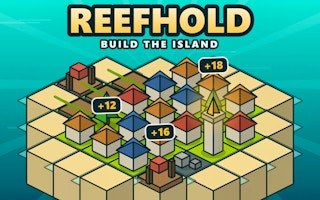
Build a compact island
Reefhold
Click a building from the tray
Play loads a game hosted by GamePix that may show ads and use cookies.
Provided by GamePix. Ads and cookies may load only after you press Play. Read the GamePix Privacy and Cookie Policy.
Start a run and inspect the current island and available buildings.
How to play
How to Play Reefhold
Read the island shape, choose one available building, preview a tile, and confirm only when the location helps your next placement as well as this one.
- 01
Start a round and look at the island boundary, open land tiles, shoreline, current score, and inventory in the building tray.
- 02
Select a building such as a Hut. Click or tap a legal tile and read the placement preview before committing.
- 03
Compare nearby land, water, and existing buildings. A tile that scores now may also block a stronger future pairing.
- 04
Press the visible Place control to confirm. Check that a building appears, the inventory decreases, and the score updates.
- 05
Continue until the available space or round ends. On the next map, inspect its shape anew rather than repeating the previous layout.
About the game
A small island makes every tile matter
Reefhold gives you a small island and a tray of buildings. Huts, fields, docks, and workshops compete for limited tiles, while adjacency affects the value of a placement. The official listing describes short rounds of roughly three minutes and a changing map. That makes the current shoreline and the buildings available in this particular run more important than a fixed opening recipe. The player task is to choose a building, place it where its neighbors help, and build as useful an island as the available space allows.
A Hut is a sensible first building to inspect because several are available at the start. Select one, preview a free tile, and read the points shown on the Place button. Confirming should add the building to the island, reduce its remaining inventory, and update the score. Those three signals help you tell a completed placement from a preview. They also help compare one candidate tile with another before you commit scarce island space.
Controls
Controls for Reefhold
- Mouse or touch
- Choose a building and inspect an island tile.
- Place button
- Confirm the currently previewed building placement.
Useful strategy
Get value from a small map
- Read each building’s visible preview rather than assuming every neighbor is beneficial.
- Reserve scarce shore tiles for placements that need the water edge.
- Avoid filling the island center before you know what the remaining inventory needs.
- Check the inventory after every placement; the next choice may be more constrained.
- Use score change as feedback on the placed tile, not as a complete measure of future value.
- On a new random map, redraw the plan around the new coastline.
Read the map before spending a tile
A small island has only a few flexible spaces. Start by distinguishing interior land from the edge and any unusually narrow corner. An interior tile may touch several future buildings, while an edge tile can be valuable to a structure that interacts with the shoreline. If you use a rare coastline tile for a building that could have gone anywhere, you may remove the only good home for a dock later. This is a planning principle, not a guarantee about a specific score rule; verify each building’s preview in the current run.
Look at the building tray at the same time as the map. If several Huts are available, you have repeated chances to place that type, but another building may be scarcer. Inventory changes after a confirmed placement, so treat it as a budget. Ask which kind of location each remaining building would reasonably need. Then choose a first tile that creates useful adjacency without sealing off all the better future spaces. A compact map rewards preserving options as much as taking an immediate point gain.
Randomized maps make memorized coordinates unreliable. Even if one layout rewarded a central Hut, the next island may have a smaller center or a deeper bay. Rebuild the plan from visible geometry each time. Identify the shoreline, open clusters, and any spaces that would become isolated if you filled a connecting tile. This quick scan takes less time than placing a building and discovering that a later tile is unreachable or unattractive.
Use the placement preview as your local rulebook
A placement preview can display an immediate point value before confirmation. When considering two locations, preview each and compare what the game itself shows. Do not assume a higher immediate number always wins: a tile that leaves a useful neighbor open can be worth more over several moves. But the preview is a concrete starting point for a decision, especially when the details of an unfamiliar building are not yet clear.
Select one building and move through a small set of candidate tiles rather than scanning the entire island at random. Compare an interior tile, an edge tile, and a tile beside an existing building if available. Notice whether the preview changes. If it does, adjacency or terrain is affecting the immediate result. If it does not, you may choose based on keeping future space open. Confirm only after you have a reason for the location. The Place action should be the end of a short comparison, not the first exploratory click.
Once you press Place, check three things: a building appears on the chosen tile, the inventory count drops, and the score updates. That visible loop matters because merely selecting a tile is a preview, not a completed move. If the score or inventory does not change, inspect whether a confirmation is still pending. Do not continue planning from a building that has not actually been placed. The next useful choice depends on the building now occupying that space.
Build clusters without closing the island
Adjacency games often tempt players to pack every building as tightly as possible. A cluster can help when neighboring types cooperate, but an indiscriminate cluster can use all flexible tiles and leave a building with a special terrain need stranded. The official listing identifies several building types; the current game preview should tell you what each available move is worth. Plan one or two placements ahead: after placing this building, which tile remains for the next one you expect to use?
A shoreline is a natural place to pay special attention to docks, while inland tiles can be compared for huts, fields, or workshops. Do not treat those labels as a complete scoring formula. The game may care about more than the obvious relationship, and its live preview is the better guide. Use the building names to form a hypothesis, then test it with visible feedback. If a dock preview is no better near water, follow what the game shows rather than forcing a thematic assumption.
Avoid making a long plan that depends on a building you do not have. The tray is a limited, visible supply. After each placement, check what remains and adjust the next two moves. A good short-run rhythm is to protect the rarest useful spaces, place a building with a good preview, and then reassess the map. This makes the island feel like a series of manageable choices instead of one perfect layout you must somehow know in advance.
Recover when the first placements are weak
If your score barely rises, first check whether you are comparing a preview with an actual placement. Select a legal tile, press Place, and watch the score. If a building was placed for a low value, study what neighbors and terrain it has. The next placement may improve the cluster, but do not throw away the remaining inventory simply to justify one weak choice. Look for the best visible move from the current position.
If you run out of good shoreline or interior spaces, identify the decision that consumed the scarce tile. On a later run, reserve that type of space until you have inspected the whole building tray. The map may be different, so carry forward the principle rather than exact coordinates. If a placement preview is not what you expected, stop and compare a second tile. The game’s displayed reward is a useful way to correct a mistaken assumption before confirming another move.
If a click on a tile seems ineffective, see whether a building is selected in the tray. A tile can be a candidate only when you are placing something, and the Place control may still require confirmation. On a touch device, make one deliberate selection and wait for the preview rather than tapping several times. A confirmed building and inventory decrease are clearer evidence of progress than the selection highlight alone.
Choose this for placement, not combat
Reefhold is a good fit when you want a short planning game where each click changes the shape of your options. Island Siege also uses an island theme, but asks you to send troops along connected routes; it is a different strategic task. Cook Line asks you to manage production and timing rather than tile adjacency. Those related games can be sensible next choices if you enjoy deciding where limited resources go, while still wanting a change in pace.
Stay with Reefhold if the enjoyable part is finding a home for one building among several imperfect choices. Read the current map, compare previews, commit one placement, and see how the score and inventory respond. The method remains useful even if a later run changes the coastline or the building sequence. You are not trying to reproduce a fixed diagram; you are learning to preserve useful space while taking points from the options actually available.
Quick answers
Reefhold FAQ
What do I do in Reefhold?
Place buildings on the island, using the current map and placement preview to choose valuable neighboring tiles.
How do I confirm a building?
Select a building and a legal tile, then use the visible Place button. Check the building, score, and inventory afterward.
Is the same layout best in every run?
No fixed layout should be assumed. The official listing describes changing maps, so read each island anew.
Should I always take the highest preview?
Compare the immediate reward with the space that remains for other buildings, especially scarce shore or central tiles.
Game information
Game details
Reefhold runs through the official GamePix-hosted player. Airy Arcade does not host the game code.
- Distributor and host
- GamePix
More about this game
Keep the break going