Rebound Rascals
Send marbles through a peg board, watch the battle, and choose a reward after a win.
- Session
- Short peg-board battles
- Controls
- Drag on the peg board to aim
- Best for
- Skill
Landscape gives you more room
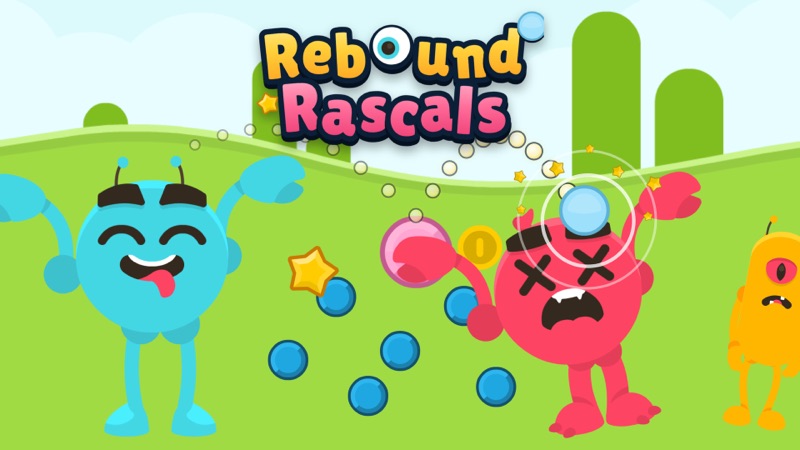
Aim a marble, beat a monster
Rebound Rascals
Drag on the peg board to aim
Play loads a game hosted by Playgama that may show ads and use cookies.
Provided by Playgama. Ads and cookies may load only after you press Play. Read the Playgama Privacy and Cookie Policy.
Check enemy health and the selected marble.
How to play
How to Play Rebound Rascals
Read the enemy and board, aim a marble through the pegs, then use the result to choose your next shot or reward.
- 01
Press Play from the title screen. The first encounter shows the hero, enemy health, the peg board, and the marbles available in your bag.
- 02
Check which marble is selected. The opening bag includes Pebbles and a Splitter; the selected marble appears above the board.
- 03
Press and drag on the board to aim. The guide line shows the initial direction. Release to shoot rather than clicking the enemy portrait.
- 04
Watch the marble travel through pegs and wait for the battle result. Compare the enemy health and hero health after the shot.
- 05
When Victory appears, read the coins, star progress and marble choices before picking a reward or the visible Skip option.
About the game
A peg-board shot becomes a small monster battle
Rebound Rascals pairs an aiming board on the right with a monster encounter on the left. You choose a marble from a small bag, drag across the peg board to set a launch direction, and release to shoot. The marble bounces among pegs before the game resolves the encounter. The opening battle gives you one blue hero with 60 health against a small green enemy, making the effect of the first shot easy to see.
The first successful encounter ends with a Victory panel, coins, star progress and a choice of another marble. That turns each short battle into a decision about the next one. This guide focuses on the controls and feedback visible from the opening fight and its reward screen. Treat later acts, enemies and marble combinations as new situations to inspect rather than assuming the same shot clears everything.
Controls
Controls for Rebound Rascals
- Mouse or touch drag on the board
- Aim the selected marble from the top of the peg field.
- Release
- Fire the marble and let its bounces resolve before the next decision.
- Marble cards
- Choose which marble in the current bag will be used for a shot.
- Reward card or Skip
- Choose an offered marble after a victory, or take the displayed Skip reward.
Useful strategy
Aim for useful contact, then read the result
- Look at the enemy health before aiming. In the opening encounter the visible enemy has only a small amount of health, so a clean first shot matters more than a complex setup.
- Use the guide line as an opening direction, not a guaranteed full path through every peg. Bounces can change where the marble goes.
- Keep the first drag small enough that you can tell which side of the board you targeted. Large sweeps make misses hard to diagnose.
- Wait for the shot and battle outcome before touching another marble card. A marble in motion has not finished dealing with the board.
- Read reward text carefully: the visible Fireball, Zapper and Splitter cards describe different effects and per-peg values.
- Do not pick a reward only because its artwork is bright. Think about whether your next encounter needs broader coverage, repeated peg hits or a different damage pattern.
Read the monster and the board together
The left side of the fight tells you what the shot is for. The hero has a health bar, the enemy has its own health number, and the act counter shows where you are in the run. The right side is the peg field where you control the launch. If you focus only on the bouncing marble, you may miss whether the enemy actually fell or whether your hero lost health. Check both sides before and after every shot so the next decision follows the game state rather than the animation alone.
At the bottom of the opening screen, the marble cards show what is in your bag. A selected Pebble is highlighted and its name appears above the board. A Splitter is also visible as a different option. You do not need to understand every future marble to begin. Start with the selected card, read the tutorial, and take one controlled shot. Later, compare a new marble’s card text with the result you want instead of treating all marbles as interchangeable.
The peg board has pins, a few standout targets, and a circular launch point at the top. The white guide line is a cue for the initial direction of the shot. It cannot tell you the exact path after repeated impacts. A good opening aim sends the marble through a useful cluster of pegs rather than toward an empty edge. Once released, let the ball bounce to its conclusion before deciding whether that direction was effective.
Turn a drag into a measurable shot
The opening tutorial says to drag on the board and release to shoot. Begin inside the large dark peg area, move your pointer a short distance toward the route you want, and let go. On a touch screen, use a finger in the board area and lift it to fire. If you click the monster on the left instead, you have not given the launcher a direction. The input belongs to the peg field, even though the consequence appears in the battle panel.
Aim for a route where the marble is likely to contact several pegs. A shallow line toward the edge risks missing much of the board; an almost vertical line may be simple but can still produce useful rebounds. The best choice depends on the current layout. Make one deliberate shot and watch the path. If it leaves the board too early, change the launch direction a little on the next attempt instead of making a huge correction without understanding the first one.
Winning the opening fight brings up a Victory panel, but that does not mean every shot wins. Later enemies may have more health or different circumstances. Judge your shot by the health bars, the result message and what remains in your bag. If the fight continues, choose the next marble based on the problem still on screen. If Victory appears, stop aiming and move to the reward decision.
Use the victory screen as preparation for the next encounter
The first Victory panel shows a coin reward, star progress and three marble choices. In that result, Fireball is described as setting a target on fire, Zapper as affecting another peg, and Splitter as splitting after its first bounce. The card also shows damage per peg and a critical value. Those labels are useful because they tell you how a marble might behave; the attractive name alone does not tell you whether it fits the board you will face next.
A practical choice starts with what your previous shot lacked. If the marble hit too few pegs, a card that can reach more positions may be more useful. If you had plenty of peg contacts but need a stronger effect on a target, compare the per-peg text. If you cannot yet tell, choose a card whose action is easy to recognize, then look for that action in the next encounter. That turns the reward into an experiment you can learn from rather than an irreversible guess about a hidden best build.
The panel also offers Skip with a stated gold amount. That is a real choice on the visible screen, not a requirement. Consider it only after reading the marble cards; extra coins and an extra marble change different parts of the run. Do not assume that one choice is always optimal, because a future board and the contents of your bag can matter. Once you choose, inspect the new battle before dragging. The act counter, enemy health and selected marble can all change.
Fix a weak shot without losing the lesson
When a marble misses the interesting part of the board, recall where the guide line pointed before release. Did you start too close to one side, or did the first bounce send the marble away? Correct the initial direction by a small amount. If you aim in a new direction each time without looking at the previous path, the pegs feel random even though you can control the launch. A simple before-and-after comparison is more useful than trying to predict every rebound perfectly.
If a shot hits pegs but the enemy remains, check the enemy health and the marble card. The number of contacts is only part of the result; different marbles describe different effects. You may need another shot, a different marble, or a route through a denser part of the board. Wait until the animation and health update finish. Rapid extra clicks while the ball is still bouncing can obscure which input produced the change.
If you want another aiming game after this session, Ricochet Shot focuses on deliberate rebounds toward a target. BallBlastPals instead asks you to fire at moving balls and manage the space around your player. Rebound Rascals sits between those tasks: you set one shot, watch the peg collisions, and then read a monster battle result. Use that distinction to pick the kind of aiming challenge you want next.
Quick answers
Rebound Rascals FAQ
How do I fire a marble?
Drag inside the peg board to aim, then release. The selected marble launches from the top of the board.
Why does clicking the monster not shoot?
The aim control is on the board at the right. Drag there and release; the monster panel shows the battle result.
What happens after the first victory?
The visible result offers coins, star progress and a choice of Fireball, Zapper or Splitter, plus a Skip option with gold.
Is the guide line the exact bounce path?
It shows the initial launch direction. Peg contacts can change the rest of the marble’s route.
Game information
Game details
Rebound Rascals runs in the official Playgama player. Airy Arcade provides this independent guide to its visible aiming and reward choices.
- Developer
- Sleepy Yak
- Distributor and host
- Playgama