Neon Vanguard Rogue Defense
Move a glowing ship through incoming enemies while its automatic shots clear a path.
- Session
- 3–10 min
- Controls
- Drag the ship with the mouse
- Best for
- Quick
Keep the ship clear
Neon Vanguard Rogue Defense
Drag the ship with the mouse
Play loads a game hosted by GamePix that may show ads and use cookies.
Provided by GamePix. Ads and cookies may load only after you press Play. Read the GamePix Privacy and Cookie Policy.
Deploy the ship and watch the approaching enemies.
How to play
How to Play Neon Vanguard Rogue Defense
Deploy the ship, drag it through open space while it fires automatically, and keep checking enemy paths, shield condition, and the room available for your next escape.
- 01
Choose Deploy Ship to enter Sector 1. Before moving immediately, locate your spacecraft near the lower area, the descending red diamond enemies, the cyan auto-fire, and the Shields and Score displays.
- 02
Keep the mouse pointer close to the ship and press to begin a controlled drag. Move toward a specific opening rather than sweeping across the whole lower screen without a destination.
- 03
Look above the ship and trace each visible enemy's downward approach. Choose a lane that avoids the immediate path and still leaves horizontal or diagonal room for the following threat.
- 04
Let automatic fire handle shooting while you manage position. Aligning beneath an enemy may help projectiles meet it, but leave early when that line also exposes the ship to a descending body or attack.
- 05
After every close pass, check the Shields bar and Score. A visible shield decrease means the recent position carried a cost; a higher score is useful feedback, but maintaining room to dodge keeps the run going.
- 06
Use the pause button when you need to stop and read the situation. The Paused — System on Hold screen offers Resume and Abort; choose Resume to return to the current session or Abort only when you intend to leave it.
About the game
Position an auto-firing ship against descending neon threats
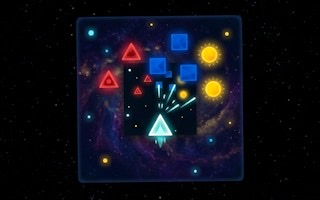
Neon Vanguard Rogue Defense is a vertical space defense game set against a scrolling star field. Select Deploy Ship to begin Sector 1. Your spacecraft sits near the bottom of the screen and fires cyan projectiles automatically, while red diamond-shaped enemies move downward from above. Because firing does not require a separate button, your main job is positioning the ship where its shots can work without leaving it in the path of incoming threats.
The ship follows a mouse drag. In the opening, dragging from the right side toward the left moves the ship with the pointer. The Score and Shields displays help you judge the run while enemies approach. Watch the shield bar after a close pass: losing shield is a reason to give the next similar threat more room, even when your score is increasing.
The useful rhythm is therefore observe, move, and reassess. Watch the space below the next enemy, decide which side offers room beyond the immediate dodge, then drag the ship smoothly into that lane. A pause button opens a Paused screen labeled System on Hold with Resume and Abort choices. This guide concentrates on the opening core: automatic fire, spatial movement, shield awareness, and Sector 1 positioning.
Controls
Controls for Neon Vanguard Rogue Defense
- Mouse drag
- Move the ship toward the pointer while holding and dragging across the play area.
- Touch drag
- The official instructions list finger dragging for ship movement on a touch screen.
- Pause button
- Open the System on Hold screen with Resume and Abort choices.
- Esc
- Use the official keyboard shortcut to pause the current defense session.
- Resume
- Return from the pause screen to the current defense session.
Useful strategy
Dodge toward space that remains useful after the first threat passes
- Watch the upper half of the play area. The earlier you identify a descending red diamond, the smaller and more controlled your escape movement can be.
- Keep a reserve lane. Parking against one side may solve the current approach but remove your ability to continue moving if the next threat closes the same edge.
- Move with a destination. A short drag from right toward a known opening is easier to evaluate than a long sweep that crosses several incoming paths.
- Use auto-fire as background pressure. Stay aligned when the lane is safe, then prioritize the ship's survival as soon as an enemy path conflicts with that firing line.
- Keep checking your Shields between dodges. If the bar falls, reconsider the last route and give similar incoming shapes more clearance on the next attempt.
- Pause before attention breaks down. System on Hold gives you a clean stop, while an unplanned cursor movement during active play can put the ship into danger.
Read descending paths before they reach the ship
The ship occupies the lower part of a vertically organized battlefield, so danger develops from top to bottom. Focus several ship lengths above your current position. A red diamond there is not yet an emergency; it is advance notice that a particular strip of space may soon become unsafe. Use that notice to move gradually rather than waiting for a last-second escape.
Think of each enemy as a moving corridor of risk. Trace the line it is following toward the bottom, then check whether another visible threat limits the obvious escape side. The best opening is not merely empty now. It should remain open long enough for the ship to enter and then leave when the next approach develops.
Do not stare at the cyan shots. Automatic fire gives constant visual activity, but the projectile stream does not need your direct input. Glance at it to understand alignment, then return attention to enemy positions and the shape of the open field around the ship.
Drag the ship with controlled distance and timing
The ship follows a horizontal mouse drag from the right toward the left. Begin close to the ship so the intended movement is clear, choose a point inside a visible opening, and move there in one smooth action. Large, aimless cursor arcs make it harder to tell which path caused damage.
Release or stabilize after reaching the safe lane, then reassess. Continuous movement can be useful when danger keeps shifting, but it can also carry the ship into a new enemy path that was harmless a moment earlier. A brief visual checkpoint turns one long reaction into a series of deliberate decisions.
The official instructions also describe finger dragging on touch devices. On any input method, keep the ship visible under your pointer or finger as much as possible and avoid covering the area where the next enemy is arriving.
Let automatic fire work while you choose safe alignment
Cyan shots leave the ship continuously once the defense begins. This frees your attention from firing rhythm and makes positioning the central skill. When the space below a red diamond is clear, holding an aligned lane can give the projectile stream time to meet the target without extra input.
Alignment is temporary, not a commitment. If the enemy continues down toward the ship or another threat enters the same lane, move away while there is still room. Automatic fire continues to provide pressure, so there is little reason to protect a perfect line at the expense of the Shields bar.
After an enemy disappears or the score changes, scan the top again. Use the score as a quick progress check between threats. When another enemy is approaching, return your gaze to its path and the open space beside your ship rather than watching the counter.
Protect Shields by preserving more than one escape route
A falling Shields bar warns that your current route is too risky. When it changes, review where the ship was relative to the nearest enemy and choose a wider clearance on the following approach. The visible loss is enough to justify more distance next time.
Open space has strategic value only when you can continue moving through it. If you dodge all the way to the left edge, identify where the next rightward route would begin. If you stay near the center, keep both sides in view and avoid becoming trapped between converging downward paths.
A modest movement often preserves more options than a full-width sweep. Leave enough room on both sides when the field allows it, and cross a larger distance only when the visible threat pattern requires it. This keeps the ship responsive without turning every dodge into a new recovery problem.
Use the pause screen to reset attention safely
The pause button changes the game to a clear Paused — System on Hold screen. Use it when you need to step away, reposition your hand, or break a chain of rushed reactions. A deliberate pause protects the current session from stray movement and gives you time to return with a specific observation goal.
Resume returns you to play, so prepare before selecting it. Recall the ship's last side of the screen, place the pointer where it will not trigger a wild drag, and focus on the upper field as action restarts. The first task is to recover the enemy picture, not to chase the old score immediately.
Abort is also visible and should be treated as leaving the current session. Read the label before selecting a menu option, especially when you want a short break rather than a new run. Resume is the option to look for when returning to the same session.
Quick answers
Neon Vanguard Rogue Defense FAQ
How do you move the ship in Neon Vanguard Rogue Defense?
Hold and drag with the mouse to move the ship toward a chosen opening. The official instructions also list finger dragging on touch screens.
Do I need to press a button to shoot?
No separate firing input is needed in the opening. The ship automatically launches cyan projectiles after Deploy Ship begins Sector 1.
What enemy appears at the start?
The Sector 1 opening shows red diamond-shaped enemies moving downward. Read any later enemy directly from the game rather than assuming it behaves like the opening shape.
What happens when the ship is hit?
Damage lowers the Shields bar. If it drops after a close pass, give the next approaching enemy more room and move toward a lane with an onward escape route.
How do I pause the game?
Choose the pause button to open Paused — System on Hold. The displayed choices are Resume for returning to play and Abort for leaving the session.
Game information
Game details
Neon Vanguard Rogue Defense is provided through the GamePix-hosted player. The external player may display advertising and is governed by GamePix's privacy terms.
- Developer
- code-master21
- Distributor and host
- GamePix
More about this game
Keep the break going