Maze Snake
Command each snake step toward the pellets while avoiding the walls and your own tail.
- Session
- Flexible short sessions
- Controls
- Press the forward button for one step
- Best for
- Arcade
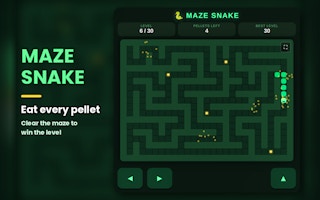
Step through the maze
Maze Snake
Press the forward button for one step
Play loads a game hosted by GamePix that may show ads and use cookies.
Provided by GamePix. Ads and cookies may load only after you press Play. Read the GamePix Privacy and Cookie Policy.
Start Level 1 and count the six remaining pellets.
How to play
How to Play Maze Snake
Check the head’s facing and next cell before every button press.
- 01
Start Level 1 and note the six-pellet counter and the snake head’s current direction.
- 02
Choose forward only if the cell ahead is open; otherwise identify a safe relative turn.
- 03
Press one command and verify that the head has moved one tile.
- 04
Recheck walls, tail, and pellets from the new position before commanding another step.
About the game
Maze Snake
Maze Snake changes the familiar snake rhythm into a step-by-step maze problem. The opening instruction screen says the snake moves only when told: the forward button advances it, while left and right turn it relative to its current facing and take a step. The task is to eat every pellet without hitting a wall or the tail. After Start, Level 1 shows six pellets left. If the head faces right, one forward input moves it one tile right; the pellet counter stays at six unless that cell contains food.
The first move illustrates the control model: the head shifts to a neighboring cell rather than starting continuous movement. The level and pellet displays help you check where you are before giving another command. Build a route from the current walls, body, and food positions; a route copied from a different board state may steer the head into an obstacle.
The key difference from ordinary snake games is the relative turn. Left and right mean change direction from the head’s current facing and then move; they are not fixed compass directions. Before each command, identify the head, its direction, adjacent wall cells, tail position, and the next pellet. This small pause can prevent a turn that steps directly into an obstacle. Because the snake waits for your input, you can plan without the pressure of automatic movement.
Controls
Controls for Maze Snake
- Press the forward button
- Advance the snake one tile in its current facing direction.
- Press the left-turn button
- Turn left relative to the current facing and step.
- Press the right-turn button
- Turn right relative to the current facing and step.
Useful strategy
Plan one safe cell at a time
- Translate left and right from the head’s current facing, not the screen edge.
- Read the next cell before commanding a turn because turning also steps.
- Use the pellet counter to confirm food was actually collected.
- Check the tail as well as walls when a corridor gets narrow.
Read the board as a sequence of cells
The maze presents corridors, walls, pellets, and a snake with a head that has a direction. Start by locating all four, not by pressing the nearest arrow. At the opening of Level 1, the display shows six pellets left. With the head facing right, a forward command targets the cell to its right. If that cell is empty, the head shifts there by one tile and the count remains six. To collect a pellet, guide the head onto a cell that visibly holds food.
Treat each move as entering one cell. If the cell ahead is a wall, a forward command is unsafe. If a pellet lies beyond a bend, you need to turn at an earlier open cell rather than at the wall itself. The on-screen instructions describe left and right as turning and stepping, so you must check the destination cell of the turn. A turn is not a harmless rotation in place.
The tail adds a moving obstacle. Even if a corridor was open earlier, part of the snake may now occupy it. The instruction screen explicitly warns against the tail. The safest habit is a visible pre-move check: compare the cell you intend to enter with both static walls and the snake body as currently drawn.
Use the relative controls correctly
Forward means continue facing the same way for one step. At the Level 1 opening, the head faces right, so one forward command moves it one cell to the right. Look for that new cell rather than relying only on the button animation. After any turn, forward will use the new facing direction, so a later forward press may travel up, down, or left depending on what happened immediately before.
Left and right are relative. If the head faces right, a left turn points it upward and a right turn points it downward. If the head later faces down, those same buttons point it right or left. The exact arrow icon may tempt you to think of fixed screen directions, but the visible instructions say turn and step. Before selecting one, mentally rotate the head’s direction and inspect the cell it would enter.
Use one command at a time and let the board settle. The game says the snake moves only when told, which gives you time to verify the result. If the head is still in the same cell, your click may not have reached the button, or the game may be resolving input. Do not assume a second press is safe until you know where the first left the head. The pellet counter can provide additional confirmation when the intended cell held food.
Build a route through corridors and pellets
A useful local plan starts with the nearest reachable pellet, not necessarily the nearest pellet by straight-line distance. Walls can make a visually close piece of food require a longer corridor. From the head, trace open cells to a pellet and identify where direction changes are needed. At each bend, remember that the turn button also advances into the newly faced cell. This produces a sequence of safe destinations rather than a vague goal.
After each pellet, recompute from the new head and tail positions. The body can occupy cells that were empty when you first studied the maze. The opening shows six pellets, but their best collection order depends on the route available from the current head and tail positions. Use the live count to tell whether your path actually reached a pellet; a movement animation without a counter change is merely movement.
If two routes seem possible, favor the one that leaves room for the next turn and avoids threading the head between a wall and its own body. This keeps the focus on safe movement rather than a score you cannot yet use to choose a path. The immediate objective is survival while gathering every pellet. A route that reaches one pellet but traps the head before the next one is less useful than a slightly longer open path.
Recover from a wrong direction or stalled input
When a command does not produce the expected move, first re-read the head orientation. A left turn from a head facing down is not the same as a left turn from one facing right. Reconstruct the last successful step and see which way the head now points. Judge each command by the before-and-after head position, not by the button press alone.
If a turn would hit a wall, do not press it just to see whether the game blocks it. Choose a safe open cell first. If your path seems boxed in, look for a bend one tile earlier where the snake could have turned. Since the game waits for input, you can inspect the corridor at leisure before committing. If you need to restart, first look for a control in the current game screen; do not assume an undo is available.
If the pellet number remains the same after a valid step, that is normal when the entered cell did not contain food. The count stays at six when the new cell is empty. Look at the head position to confirm movement. Conversely, if you expect a pellet and the count does not change, check whether the food is one cell beyond the current head or hidden by the maze art. A changed count is stronger proof of collection than proximity alone.
Practice a calm command loop
For each move, use the same loop: face, destination, command, verify. Identify the current facing; inspect the destination of forward, left, or right; press the chosen button once; then check the new head cell and pellet counter. This process is slow by design and matches the game’s stated step-command pacing. It is more dependable than holding an arrow and hoping the snake stops at the right bend.
The level display is a progress marker. At the opening it shows Level 1/30, but every later board should be read on its own terms. Do not use a remembered route from another level to plan the current path. Every maze can be read from its live wall and food layout using the same local method.
When you pause a session, leave the snake at a stable cell and recheck direction before the next input. A player who remembers where the head was but forgets which way it faced can make a dangerous relative turn. If a first forward step moves the head right without collecting a pellet, use the neighboring cells in your current run to choose the next safe command. The body and wall arrangement matter more than a fixed sequence of arrows.
Quick answers
Maze Snake FAQ
Does the snake move continuously?
The opening instructions say it moves only when told. One forward command advances one tile; check the new head position before choosing the next command.
Do left and right rotate in place?
The visible instructions say they turn relative to the current facing and take a step. Inspect the destination cell before pressing either button.
How do I tell whether I collected a pellet?
The head must enter a cell containing food, and the pellet counter should decrease. If the head moved but the count stayed at six, that step did not collect a pellet.
Game information
Game details
This game runs in the official GamePix publisher player. The external game may use cookies or show advertising under GamePix terms.
- Distributor and host
- GamePix
More about this game
Keep the break going