Hard Crash: Zombie Rush
Drag the squad along the bridge, line up automatic fire with barrels, and read soldier gates.
- Session
- Short play sessions
- Controls
- Hold and drag left/right
- Best for
- Quick
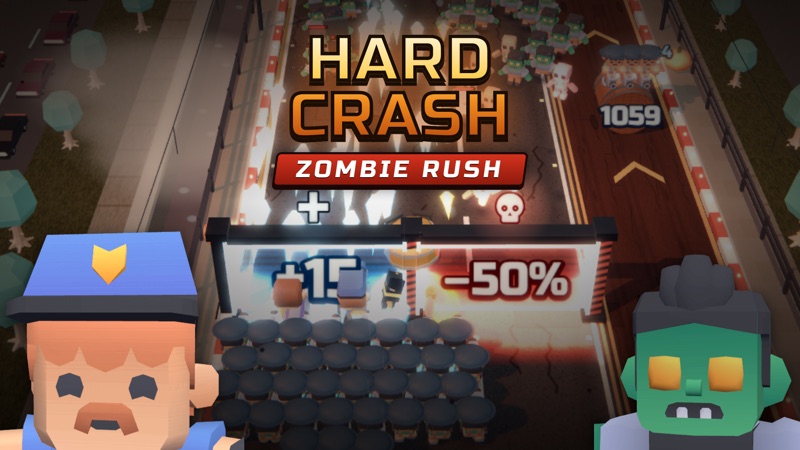
Line up the squad
Hard Crash: Zombie Rush
Hold and drag left/right
Play loads a game hosted by Playgama that may show ads and use cookies.
Provided by Playgama. Ads and cookies may load only after you press Play. Read the Playgama Privacy and Cookie Policy.
Continue the steering tutorial before moving.
How to play
How to Play Hard Crash: Zombie Rush
Use the first tutorial to learn drag steering, straight-ahead fire, and the meaning of each target.
- 01
Open the player and let Stage 1 load. Read the first steering message and choose TAP TO CONTINUE.
- 02
Hold the left mouse button over the play area and drag horizontally to move the squad left or right.
- 03
Line up with a barrel so automatic bullets reach it. Watch its displayed number decrease while the squad advances.
- 04
Read the operation on an upcoming soldier gate and place the squad on the intended side before reaching it.
- 05
Continue through the next teaching message. When a hero portrait is highlighted as charged, follow the prompt to activate that skill.
- 06
After a skill use, check its ring and return your attention to the forward route. Keep steering toward useful targets while avoiding harmful gates.
About the game
Steer the squad while its soldiers fire ahead
Hard Crash: Zombie Rush by mosquito games is a browser squad runner set on bridges through a zombie-filled city. Use Play above to open the official player. The opening Stage 1 tutorial asks you to drag the squad left and right while the soldiers shoot straight ahead automatically. Your first job is positioning: put the group in line with a useful gate or barrel, rather than looking for a separate button for each ordinary shot.
The tutorial pauses to explain steering, reinforcements, and a charged hero skill. Read each message and use TAP TO CONTINUE before expecting the squad to respond. A barrel carries a number that decreases under gunfire, while a gate carries an operation such as +12 or ×2. Those are different targets: you shoot a barrel along your firing line and move the squad through a gate.
This guide focuses on that opening control loop. It identifies the mosquito games release, explains the visible tutorial, and helps you read the next route decision. The wider base, heroes, and later districts described by the publisher are longer progression systems; their presence does not mean you need to master or purchase anything before learning to steer.
Controls
Controls for Hard Crash: Zombie Rush
- Hold and drag left / right
- Steer the squad horizontally in the opening desktop tutorial.
- Automatic firing
- Soldiers shoot straight ahead while you position the squad.
- TAP TO CONTINUE
- Dismiss the current tutorial message and resume its lesson.
- Click a charged hero portrait
- Activate the skill when the tutorial or live ring indicates it is ready.
Useful strategy
Read the target before moving into its lane
- Position early: a barrel must be ahead of your bullets, while a gate must be on the squad’s route.
- Check the symbol as well as the number. An addition and a multiplier describe different changes.
- Watch a barrel’s number to confirm that your firing line is reaching it.
- Use small horizontal corrections so you can compare the squad’s position with the next target.
- Pause your input while reading a tutorial card, then use its visible continue prompt.
- A highlighted skill portrait is a specific action cue; it does not mean every portrait is ready at the same time.
Your horizontal position chooses what the bullets reach
The tutorial states that soldiers shoot straight ahead. This makes steering part of aiming even though you do not press a button for ordinary fire. Move the group into the lane of the barrel or threat you intend to hit, then watch the visible response. A barrel number that falls is a clearer confirmation than bullets passing somewhere nearby.
Look ahead along the bridge before making a large drag. You need enough space to approach a useful target without crossing into a harmful gate beside it. Small corrections let you judge whether the squad is lined up, then release the mouse while the game advances. A long sweep across the whole bridge can overshoot the lane you were trying to use.
If a target is not reacting, first compare its position with the firing line. Do not assume that you need a manual shooting key or a weapon purchase. The opening is designed to teach how movement and automatic fire work together. Understanding that relationship is more useful than clicking randomly around the squad.
Read an operation gate differently from a numbered barrel
An operation gate displays a change such as addition, multiplication, or subtraction. The publisher describes beneficial soldier gates and red gates that reduce the group. Read the sign and the number together before choosing a side. Do not use color alone when the displayed operation already tells you what kind of choice is approaching.
A barrel’s number is a target to reduce with gunfire. The opening reinforcement lesson asks you to line up and shoot until the number reaches zero. You are not choosing a mathematical operation on the barrel; you are giving your automatic bullets time to reach it. Keep that distinction clear when a gate and several barrels appear in the same view.
After passing a gate or clearing a target, inspect the group and any visible popup before planning the next move. The opening can show reinforcement changes, but one popup does not establish a fixed reward for every barrel. Use the current lane and target as the basis for your decision rather than copying a reward expectation from a different run.
A tutorial card can hold the squad while you read
Stage 1 introduces its systems through overlay cards with TAP TO CONTINUE. While one is visible, the game may be holding the scene for the lesson. Read the message before repeating a drag that appears to do nothing. Continue through the card, then perform the action it describes in the play area.
The sequence covers horizontal steering, a reinforcement barrel, and a charged hero portrait. Treat each as a separate lesson. First understand where the squad moves, then understand what its straight-ahead fire reaches, then learn the extra skill action. Pressing ahead through several cards without reading can leave you unsure which input belongs to the current screen.
If you leave the player and return to a visible pause prompt, resume through that prompt before continuing. A waiting lesson, a paused player, and a loading screen are different states. Identify the visible instruction first so you do not reload a functioning game merely because it is waiting for a specific click.
Use the portrait and ring to recognize a ready hero action
The opening highlights Grenade Rain when the hero skill is charged and asks you to tap the portrait below. Use the named portrait rather than treating every circle near the bottom as the same button. After activation, its ring changes, giving you feedback that the skill action was accepted.
A charged skill is separate from ordinary automatic firing. Your soldiers keep using the forward firing line while you manage the extra action. After pressing a portrait, look back toward the bridge and the next target. Focusing only on the bottom controls can distract you from a gate that is approaching the squad.
Other portraits and later heroes may offer different actions. Read their live name and readiness cue instead of assuming identical effects or charge times. The first tutorial establishes how to recognize and activate a ready skill; it does not provide a complete hero ranking or a guaranteed sequence for winning every district.
Learn one clean steering sequence before exploring the base
For the first attempt, aim to make a clear sequence you can repeat: continue the lesson, drag into a useful lane, watch a barrel respond, read a gate, and recognize a ready portrait. This gives you several concrete checks on the controls. It is more informative than judging the session only by whether you reached the end of the bridge.
The publisher describes a wider campaign and base progression. Those systems can be inspected after the opening makes sense. Read current building or hero descriptions before using resources; menu icons alone do not explain prices, offline income, or the effects of future upgrades. A first steering lesson is not enough to choose a complete progression plan.
If an attempt goes badly, identify the action that became unclear. You may have overshot a gate, failed to align with a barrel, or overlooked a tutorial pause. Change that one part of the next attempt. Keeping the rest familiar makes the result easier to understand and helps you decide which skill to practice next.
Quick answers
Hard Crash: Zombie Rush FAQ
Where can I play the exact Hard Crash: Zombie Rush?
Use Play above for the official Playgama player by mosquito games. The source link below identifies that release, which helps separate it from similarly named zombie runners and squad games.
How do I move and shoot in the first stage?
Hold and drag horizontally to steer the squad. Soldiers fire straight ahead automatically, so position the group in line with the target. The opening tutorial explains this before the barrel lesson.
What do + and × gates mean?
The publisher describes + gates as adding soldiers and × gates as multiplying the group. Red subtraction gates reduce soldiers. Read the visible sign and number on the current gate before choosing a lane.
How do I shoot a reinforcement barrel?
Place the squad in front of it so automatic bullets hit the barrel. Watch its number decrease. The opening lesson asks you to keep firing until it reaches zero; a decreasing number confirms that the lane is aligned.
Why is my drag not moving the squad?
Check for a TAP TO CONTINUE tutorial card or a visible pause prompt. Continue that instruction first, then drag in the play area. Release the mouse between separate movements so the next action starts clearly.
When should I click a hero portrait?
Use the live readiness ring and tutorial highlight. In the opening, a charged Grenade Rain portrait is specifically highlighted; clicking it changes its ring. Do not assume that another hero is ready or has the same effect.
Game information
Game details
Hard Crash: Zombie Rush is developed by mosquito games and distributed through the official Playgama player.
- Developer
- mosquito games
- Distributor and host
- Playgama
More about this game
Keep the break going