Firewall Merge
Buy a basic defense with in-game silver and merge equal shields during the incoming wave.
- Session
- Flexible short sessions
- Controls
- Click or tap Buy LV1 to place a basic defense
- Best for
- Merge
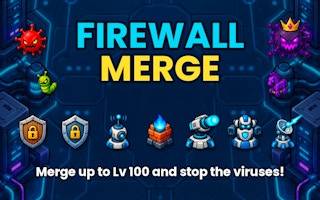
Build stronger defenses
Firewall Merge
Click or tap Buy LV1 to place a basic defense
Play loads a game hosted by GamePix that may show ads and use cookies.
Provided by GamePix. Ads and cookies may load only after you press Play. Read the GamePix Privacy and Cookie Policy.
Read the current wave and hearts before spending silver.
How to play
How to Play Firewall Merge
Build a matching pair, merge it, and check whether your defense improved.
- 01
Start Wave 1 and identify the hearts, available silver, empty grid cells, and Buy LV1 control.
- 02
Use in-game silver to buy a basic defense; this is a game resource, not a real payment.
- 03
When two equal level-one units occupy the board, drag one onto the other.
- 04
Confirm the resulting level-two unit and continue watching the wave and hearts.
About the game
Firewall Merge
Firewall Merge puts a small defense grid between incoming enemies and a row of hearts. The opening screen labels Wave 1, shows five hearts, and offers a BUY LV1 button for ten units of in-game silver. The tutorial tells you to drag two equal defenses together to merge them. That makes the central loop easy to describe: place a basic defense, create a matching pair, combine it, and judge whether the stronger unit helps the active wave.
One early merge turns two level-one Steel Shields into a level-two Steel Shield. The game confirms the action with a New defense message and a Highest defense 2/100 display. This is stronger evidence than the drag animation alone: the unit label and highest-level readout both change. The silver total can also move while enemies are active, so do not assume that every change in currency came from a purchase. Look at the unit on the board and the explicit level feedback when deciding whether a merge worked.
The useful challenge is timing and space. Buying every time silver is available may fill the grid with weak pieces, while merging at the wrong moment can temporarily reduce the number of separate defenders. Watch where enemies are moving, which hearts remain, and whether you have two identical units that can be combined without neglecting an open route. The introductory wave is enough to learn the mechanics; later enemy patterns and level claims should be judged from the live board rather than guessed from the title.
Controls
Controls for Firewall Merge
- Click or tap BUY LV1
- Spend the displayed in-game silver cost to add a basic defense when an eligible space is available.
- Drag equal defenses together
- Combine two units at the same level into a higher-level defense.
- Watch wave and heart indicators
- Use the visible status to decide whether the current arrangement protects the route.
Useful strategy
Merge for a reason
- Check the wave and hearts before taking attention away from the enemy route.
- Buy a first unit only when the in-game silver covers its displayed cost.
- Look for matching levels before dragging; unlike units are not the instructed merge pair.
- Verify a merge with the new unit label or highest-defense readout, not movement alone.
- Keep room for later purchases and do not assume a full grid is automatically a strong grid.
Learn the first defense loop
Start by locating the path enemies use and the grid squares where units can stand. The hearts communicate how much failure the current run can absorb. The BUY LV1 button is a simple way to enter the defense loop: it displays a cost of ten in-game silver in the opening wave. A first purchase produces a level-one unit. Do not confuse this in-game currency with a store checkout; the visible button belongs to the running game board.
The tutorial points to the merge rule: drag two equal defenses together. On the opening grid, matching level-one Steel Shields can combine into a level-two Steel Shield. The resulting message names the new defense, and the Highest defense display advances to 2/100. These indicators tell you the board has genuinely upgraded, even if an enemy animation or shifting silver total makes the screen busy. Wait until the merge settles before trying another drag.
After that first upgrade, return attention to the active wave. A stronger unit is useful only if it helps defend a relevant lane. The game shows both threats and a survival indicator, so evaluate the immediate board rather than chasing the largest possible number. If several paths are exposed, you may need more coverage before investing in another combination. If one position clearly handles the danger, saving silver or preparing a next matching pair may be reasonable.
Spend silver with the grid in mind
Before buying, count empty cells and identify where an additional defender could contribute. A purchase gives you another piece, but its value depends on placement and whether it completes a pair. If the grid is nearly full, a merge may open space; if it is sparse, spreading two basic units may cover more than one upgraded unit. Use the wave's actual route to decide, not a blanket rule to always merge immediately.
The silver total can change during active play. Enemy events and purchasing can occur close together, so a simple before-and-after currency difference is not always a clean measure of a single click. The buy control's displayed cost is a clearer planning number. After buying, inspect the new defense on the board. If no unit appears, do not keep clicking blindly; check whether there was enough silver, whether placement space exists, and whether the wave is still active.
Once two equal levels are present, choose the source and destination carefully. Begin the drag on the center of one unit and release on the matching unit, rather than on an empty neighboring tile. A successful combine should replace the pair with an upgraded defense and update the level feedback. If the units remain separate, first check the displayed level on each one. Repeating the same unsupported gesture will not solve a mismatch.
Read the wave while managing merges
A defense puzzle can invite you to look only at the unit grid. Resist that during a live wave. Wave 1 is visible from the start, as are the hearts. These are different kinds of information: the wave label locates the run's current stage, while the hearts show how much damage can be tolerated. If hearts drop, improving a remote corner of the grid may be less useful than placing or keeping a defender near the current threat.
The first level-two Steel Shield demonstrates the upgrade system, but the displayed 2/100 is a highest-defense indicator, not proof that a player has reached all higher levels or completed the run. Treat it as a local milestone. A unit that merges successfully may still need support if several enemies approach. Conversely, buying many separate level-one defenses may leave you without the power needed for tougher enemies. Watch the actual damage and survival state before committing to either extreme.
If you are uncertain whether to buy or merge next, pause on a short question: what problem is visible now? An unguarded route suggests coverage. A matching pair occupying space without stopping threats suggests an upgrade. Low silver suggests waiting for a legitimate in-game opportunity rather than tapping a disabled control. Use the board's own feedback to make these decisions and revisit them whenever the wave changes.
Avoid common opening mistakes
A frequent mistake is dragging two defenses that look similar but have different levels. The tutorial specifically says equal defenses. If the merge does not complete, inspect both labels before changing technique. Another mistake is starting a drag from outside a unit, especially on a crowded grid. Use a clean center-to-center movement and allow the game to settle. The New defense message and highest-defense readout are better confirmation than a brief flash.
It is also easy to spend silver without a plan. The BUY LV1 button is tempting because it is prominent, but each purchase should either protect a route or create a useful matching pair. If no empty tile is available, more clicks are unlikely to help. If the hearts are being lost, examine whether the current unit arrangement reaches the enemy's path before you invest in a distant upgrade.
Do not treat optional reward prompts as part of the required loop. The core opening is available through visible in-game silver, buying, and merging. A player can practice the basic defense decision without tapping a video-reward or advertisement control. If you restart after a weak opening, compare what changed: placement, timing, or choice to merge. Make one adjustment at a time so the next attempt teaches you something.
Use feedback to plan the next wave
The most reliable planning habit is to record three pieces of information mentally after every action: current hearts, available silver, and the level and positions of defenses. A level-two unit may be an improvement, but it also replaces two level-one pieces with one stronger piece. Whether that trade is good depends on where enemies are and what attacks the game shows. You do not need to memorize a universal build order.
When the board gets busy, the highest-defense label can help confirm your largest merge, while the grid shows coverage. Keep these separate. The level indicator tells you that a combination occurred; it does not say every lane is safe. The heart count tells you whether the overall defense is holding. The wave label gives you a moment to reset priorities as the run progresses. Reading all three prevents a satisfying merge animation from hiding a failing position.
Return to the initial loop whenever the board feels complicated: observe the threat, buy a useful basic unit if silver permits, merge a verified equal pair when the upgrade serves the defense, and inspect the result. This turns a rapid-looking game into a sequence of small, checkable decisions. The strongest next move is the one that addresses a visible problem, not necessarily the one with the largest number.
Quick answers
Firewall Merge FAQ
How do I create a stronger defense?
Drag one defense onto another at the same level. In the opening, two level-one Steel Shields make a level-two Steel Shield.
Is BUY LV1 a real-money purchase?
No. The opening button shows a cost in the game’s silver currency. Do not confuse it with an external payment or advertisement.
How can I tell whether a merge succeeded?
Look for the new defense label and the highest-defense readout, then inspect the grid where the pair stood.
Game information
Game details
This game runs in the official GamePix publisher player. The external game may use cookies or show advertising under GamePix terms.
- Distributor and host
- GamePix
More about this game
Keep the break going