Eat a smaller fish
Steer a small shark with WASD, eat smaller prey, and leave room to escape larger fish.
- Session
- Short play sessions
- Controls
- WASD to swim
- Best for
- Skill
Landscape gives you more room
Swim, feed, survive
Eat a smaller fish
WASD to swim
Play loads a game hosted by Playgama that may show ads and use cookies.
Provided by Playgama. Ads and cookies may load only after you press Play. Read the Playgama Privacy and Cookie Policy.
Choose START and click inside the ocean.
How to play
How to Play Eat a smaller fish
Learn how far a short key press moves you before pursuing larger prey.
- 01
Open the player and select START from the main menu.
- 02
Locate your shark, its number, the top display, and the pause button.
- 03
Click inside the underwater scene, then use a short WASD or arrow-key movement.
- 04
Approach a fish that is clearly smaller while keeping away from larger creatures.
- 05
Watch for feeding and growth feedback as you move; ordinary feeding does not need a separate attack button.
- 06
Release movement to reassess the next target and use Pause before stepping away.
About the game
Swim toward smaller prey and leave room to escape
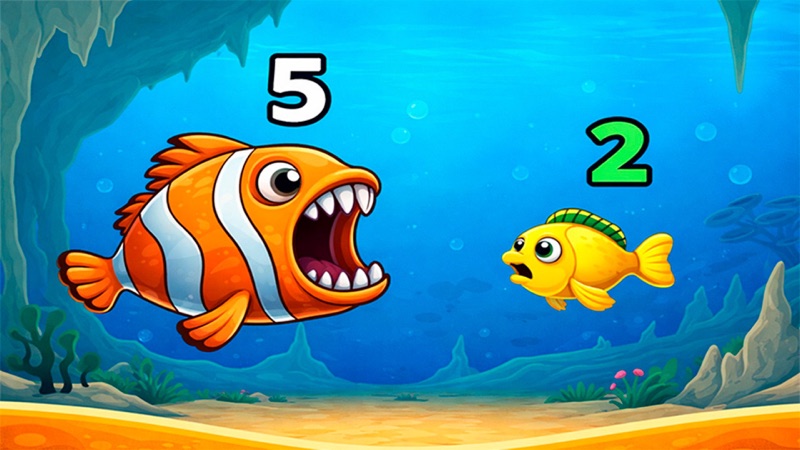
Eat a smaller fish by Asmodeus is a browser survival game distributed through Playgama. Start with a small shark, move through the sea, and feed on smaller fish to grow. Larger creatures remain a threat while you are small. Use Play here to open the official player, then select START on the underwater menu to begin.
On desktop, click inside the game and use WASD or the arrow keys to swim. Your first useful task is a short, controlled movement toward a clearly smaller target. You do not need a separate attack key for ordinary feeding. Watch the shark, its surroundings, and the number displayed above it; the larger display near the top follows that number as the run develops.
This page covers the Asmodeus game with a shark, an underwater scene, and START, SETTINGS, SKINS, and DIFFICULTY on its menu. Many games use similar fish-eat-fish names. Use the developer and official source below to identify this one rather than expecting the controls or progression of Feeding Frenzy or another ocean game.
Controls
Controls for Eat a smaller fish
- WASD
- Swim around the ocean on desktop.
- Arrow keys
- Alternative desktop movement listed by the publisher.
- On-screen joystick
- Publisher-listed mobile steering; use the control shown by your device.
- Pause button
- Use the pause icon near the top of the play area when taking a break.
Useful strategy
Choose a safe route before choosing a meal
- Begin with clearly smaller fish instead of testing a nearly equal opponent.
- Use short movements near danger; a held direction can carry you across much of the screen.
- Check beyond the target so that catching it does not take you into a larger fish.
- Keep an open direction available for retreat rather than getting trapped near an edge.
- Follow the number above your shark as well as its appearance to notice progress.
- Separate the coin display and optional video-reward buttons from the basic feeding task.
Learn movement distance before holding a direction
The shark can cross a substantial part of the screen during a held movement. Start with a brief press, release it, and check the new position. This gives you a useful sense of speed without committing to a long chase. A small target near the center can become a dangerous destination if a larger fish crosses the same route while you are still holding a key.
Use changes of direction deliberately. Move toward a clear area, inspect the creatures entering it, and then decide where to go next. Constantly holding a direction because the shark looks safe now makes it harder to react to a new arrival. Short corrections are especially useful when passing near the edge or turning away from something much larger.
If nothing moves, click inside the actual underwater play area before trying the listed movement keys again. The surrounding page and the hosted game can receive keyboard focus separately. First confirm a small movement in open water; then return to hunting. Repeatedly reopening the entire player makes it harder to tell whether focus or a new round changed the result.
A smaller target is useful only when the approach is safe
The publisher’s central rule is to eat smaller fish and avoid larger predators. Apply that conservatively at the beginning: choose an obviously smaller creature and avoid uncertain, nearly equal encounters. The ocean contains different shapes and colors, so do not assume that a familiar color makes every member of that type safe to approach.
Look at the space around the prey before moving toward it. A clear route in and a clear route out are more valuable than a target that sits between two larger creatures. If a bigger fish starts crossing the approach, turn away and choose another meal. You are trying to extend a growing run, rather than collect one particular fish at any cost.
Recheck after growth. A target that was dangerous earlier may become more manageable later, but that does not mean every nearby creature is now safe. Compare the current shark and current target again. Let the live feedback guide your next step rather than treating the first successful bite as permission to attack the whole screen.
Watch growth feedback separately from coins
The shark has a number above it, mirrored by the large top display. Keep those in view while feeding so that you can recognize progress even when the scene is moving quickly. A number changing during a swim is useful feedback to compare with the shark’s appearance and the creatures around it. You do not need to derive an exact growth formula before playing.
The coin balance appears separately toward the top-right. Do not assume that an increase in the shark’s displayed number must also increase that balance. These are different readouts. Check the specific display involved when deciding what changed, rather than looking only at one counter and concluding that feeding did nothing.
The menu and play area also show optional controls, including skin and difficulty choices, plus symbols, and a video-reward button. Learn the ordinary movement and feeding loop before exploring them. Read any live prompt before accepting an optional reward or upgrade. A button with a large number beside it does not establish that you need it to start the basic run.
End a chase before it removes your escape route
A common beginner problem is watching only the meal being pursued. The target can lead you toward a much larger fish or leave you pressed against an edge. Glance around your shark between movements. If the safe space is shrinking, stop chasing and steer into open water before the route closes.
The official description also lists hazards such as nets, hooks, octopuses, and other sea creatures. Treat unfamiliar objects cautiously when they appear. Their appearance alone does not explain exact damage, timing, or protection rules, so avoid testing one while surrounded by predators. First learn the ordinary fish encounters and leave room to change direction.
Use the visible pause button when you need time away from the run. Locate it while the scene is still manageable rather than searching for it during an urgent escape. For a longer session, return your attention to the current shark, current creatures, and current displays after resuming; a remembered plan is useful only if the scene still supports it.
Quick answers
Eat a smaller fish FAQ
Where can I play Eat a smaller fish by Asmodeus?
Use Play on this page for the official Playgama browser player. The developer is Asmodeus. Check that identity when comparing similarly named fish games.
How do I move the shark?
Click inside the game and use WASD on desktop. The publisher also lists arrow keys and an on-screen joystick for mobile devices. Begin with a short press to judge movement distance.
Which fish should I eat first?
Choose fish that are clearly smaller than your shark, as described by the publisher. Avoid uncertain equal-size encounters and larger predators, and check the route around a target before chasing it.
Do I need an attack button?
Ordinary feeding happens as you move into suitable prey. Start by learning movement and approaching clearly smaller fish; there is no separate attack key in the publisher’s basic control list.
Why does my shark grow while the coin counter stays the same?
The number above the shark and its matching top display are separate from the coin balance. Read them separately instead of expecting every growth change to pay coins.
Can I use touch controls?
Playgama lists Android and iOS support with joystick steering on mobile. The actual control layout and comfort depend on the player shown on your device.
Game information
Game details
Eat a smaller fish is developed by Asmodeus and distributed through the official Playgama player.
- Developer
- Asmodeus
- Distributor and host
- Playgama
More about this game
Keep the break going