BOXESinDOTS
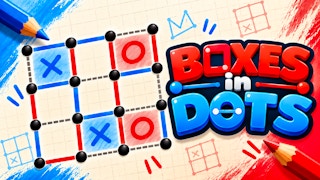
Draw a line between neighboring dots and work toward completing squares against the bot.
- Session
- Flexible short sessions
- Controls
- Click or tap between adjacent dots
- Best for
- Puzzle
Claim the next box
BOXESinDOTS
Click or tap between adjacent dots
Play loads a game hosted by GamePix that may show ads and use cookies.
Provided by GamePix. Ads and cookies may load only after you press Play. Read the GamePix Privacy and Cookie Policy.
Start the default bot board and locate an unfilled edge.
How to play
How to Play BOXESinDOTS
Place one horizontal or vertical edge between neighboring dots and watch whose turn follows.
- 01
Start the default P1 versus Medium bot board and read the 0–0 score and boxes-left display.
- 02
Find two adjacent dots with an empty edge; do not skip over a dot.
- 03
Click or tap the midpoint to draw one line, then wait for the bot turn to resolve.
- 04
Before your next line, count the sides of every neighboring square and consider who could close it.
About the game
BOXESinDOTS
BOXESinDOTS turns a grid of dots into a small territorial contest. The default board shows 6×6 dots, P1 marked X, a Medium bot, a 0–0 score, and 25 boxes left. Clicking between neighboring dots draws an edge and hands the turn to the bot. Watch for the new line and the AI THINKING label before planning your next move.
The game itself states the key box rule: draw horizontal or vertical lines between adjacent dots; the player who completes the fourth side of a one-cell box claims it and receives an extra turn. That rule changes how you choose even the first line. Count the sides of nearby squares before committing an edge, then use the score and turn indicator to see who benefits. If you choose an online or local mode, read its current opponent and turn labels rather than assuming the bot setup carries over.
A good first move is not simply any empty edge. Every line becomes part of nearby squares, and the fourth side can give a point to whoever places it. Before clicking, count the existing sides of the one or two squares that touch your candidate edge. The opening board is large enough that a single line feels harmless, but future moves can hand the bot a nearly closed box. Keep the score and remaining-box display in view as the grid fills.
Controls
Controls for BOXESinDOTS
- Click or tap an empty edge
- Place a line between two adjacent dots when it is your turn.
- Read the turn indicator
- Wait for the bot and identify when you can place the next line.
Useful strategy
Count before you connect
- Check both squares touching an interior edge; the same line affects two boxes.
- Avoid creating a third side unless you have a reason to give the next player a closing move.
- Use the score and boxes-left counter to confirm that a box, rather than only a line, was claimed.
- Remember that the visible rule gives an extra turn when a player closes a box.
Understand what an edge can change
The first task is to distinguish dots, lines, and boxes. Dots mark the grid intersections. A legal line joins two neighboring dots horizontally or vertically. Four lines around one small cell make a box. The default 6×6 array of dots leaves 25 possible one-cell boxes. A click on an empty top-row edge adds a blue segment, but it does not score until that segment is the fourth side of a box. Read the 0–0 score separately from the line you just drew.
An outside edge borders one potential box; an interior edge may border two. This difference makes the center of the board more consequential later. When you consider a move, inspect every box that shares that edge and count how many sides it already has. If one box has three sides, your line may close it. If one has two, your line may create a three-sided gift for the next player. The same move can affect two boxes differently.
The screen showed P1 as X and the bot as the opponent. When the first line appeared, the interface said AI THINKING. That turn change is as important as the line itself: you cannot safely plan two ordinary moves in a row. The visible rule says closing a box earns an extra turn, so use the current turn label after any point rather than assuming control always alternates.
Place a deliberate opening line
Aim at the midpoint between two adjacent dots. Once the segment appears blue and the turn label changes to AI THINKING, wait for the bot to answer. This is the ordinary turn flow after an edge that did not close a box. If you click a dot rather than the open space between dots, you may not create an edge. Aim for the short gap and wait until the segment is visible before trying another input.
Early in a blank game, many edges look equivalent because no square is close to completion. The best practical habit is to rehearse the side count anyway. Choose a gap, inspect the box below or beside it, and ask what the new line would leave for the bot. You are training the same judgment needed when the board becomes crowded and one careless edge could become a free point.
Do not treat the first blue segment as a box or a score. The default score begins at 0–0 with 25 boxes left. A line is progress in building the grid, while a box requires the fourth boundary. To tell whether a point was actually awarded in your session, look for the box marking and a changed score or remaining-box count after the animation settles.
Avoid giving away the fourth side
The most common tactical mistake in dots-and-boxes is creating a square with three completed sides while the other player is about to move. If that player can draw the remaining edge, the rule on the game screen says they claim the box and take an extra turn. Before placing a line, count each neighboring square: zero or one side is usually less urgent; two sides deserves caution; three sides is an immediate closing opportunity.
A single edge can touch two boxes, so make the side count twice for interior moves. You might close one box but leave another with three sides. That can be a tradeoff worth taking, but know which score and turn sequence you expect before clicking. The screen’s counters and active-player label will tell you what really happened. A useful next step is to compare the two affected squares and avoid leaving an easy fourth edge for the opponent.
If most safe edges have disappeared, slowing down helps more than reflexive clicking. Identify any box you can complete now, and then inspect the boxes that share its final edge. If you cannot close a box, look for a line that leaves the fewest obvious fourth-side chances. Against a bot, the next move may happen quickly, so finish your side count before handing control over.
Read scores, turns, and game mode carefully
The initial layout displayed P1 (X), Bot (Medium), a 0–0 score, and 25 left. Those labels answer different questions. P1 and Bot identify participants; the score records claimed boxes; the remaining number tracks squares not yet claimed. A newly drawn edge does not have to change either score. Do not diagnose a failed input solely because the score stayed at zero; check whether the line appeared and the turn changed.
The menu also offers online and local two-player play. In those modes, check the participant names and turn labels before making the first move; the default Medium bot setting describes only the bot board. If you choose another mode, look for its current opponent and turn labels. Do not assume the Medium bot difficulty or the same menu choices apply to every session.
When a square closes, the game’s displayed rule says the closer takes an extra turn. That means ordinary turn alternation has an exception. Recheck whose turn it is after any box, especially if the board colors or symbols change. If the interface briefly says AI THINKING, wait for the bot to finish before deciding whether your next click was ignored.
Practice with a small local plan
For a manageable first round, watch a small cluster of neighboring boxes rather than trying to optimize the whole 25-box board. Record which edges already exist around those cells. On your turn, compare two candidate edges and name the consequence for each neighboring square. This is useful even if the bot responds elsewhere, because it makes the effect of your own line explicit.
After the bot plays, update your count from the new board. A move that looked safe one turn ago may now complete a third side or set up a close. If you accidentally offer a box, use the score and boxes-left counter to see what the bot actually claimed. One lost point is feedback about the local pattern, not a sign that the whole match is decided.
Judge progress by completed boxes rather than by the number of lines you have placed. A board can gain many edges while the score remains unchanged. When you return to the board after a pause, first read the active player, then the score, then the side counts in the area where you plan to place a line. This order prevents clicking while the bot is still thinking or gifting an easy fourth edge.
Quick answers
BOXESinDOTS FAQ
What happens after I draw a line?
The empty edge fills with a colored line. If it does not complete a box, the bot takes its turn; if it is the fourth side, check for a claimed box and the extra turn described by the game.
How does a player score?
The visible instructions say the player who draws the fourth side of a small box claims it and gains an extra turn. Confirm each claim in the live score and boxes-left display.
Why did the score stay at zero after my line?
A line alone is not a completed box. Check whether the edge appeared; a point follows only when a one-cell square is closed.
Game information
Game details
This game runs in the official GamePix publisher player. The external game may use cookies or show advertising under GamePix terms.
- Distributor and host
- GamePix
More about this game
Keep the break going