Ancient Armies vs Modern Weapons
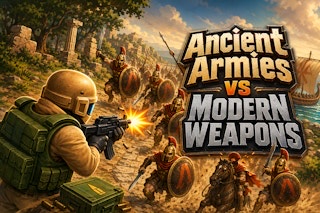
Face advancing ancient armies with modern weapons while moving clear of enemies and managing ammunition.
- Session
- Short score runs
- Controls
- Arrow keys to move; Space to fire
- Best for
- Skill
Move, fire, reload
Ancient Armies vs Modern Weapons
Arrow keys to move; Space to fire
Play loads a game hosted by GamePix that may show ads and use cookies.
Provided by GamePix. Ads and cookies may load only after you press Play. Read the GamePix Privacy and Cookie Policy.
Move away from approaching warriors and fire along a clear lane.
How to play
How to Play Ancient Armies vs Modern Weapons
Move continuously, fire from a useful distance, switch before low ammunition leaves you exposed, and visit the ammo crate only through a clear route.
- 01
Start the level and locate the soldier, incoming enemies, the current weapon and ammo display, and the supply crate before holding the fire control.
- 02
Use the Arrow Keys to move on desktop. Press Space to fire while steering so advancing infantry or cavalry does not close along one straight path.
- 03
Use 1, 2, and 3 to select the machine gun, flamethrower, or grenades according to the official controls. Confirm the weapon label and ammo state after switching.
- 04
Match the tool to the threat. The machine gun is labeled Long range; for the other weapons, judge the available space and enemy formation, then switch early enough to confirm how the new option behaves.
- 05
Watch the ammunition display rather than waiting for a weapon to become unavailable. Move first, then switch to an option with ammunition or plan a route to the crate.
- 06
Before stepping on the crate, select the weapon that needs ammunition. The crate refills only the held weapon, and you cannot fire while standing on it, so leave as soon as the reload is complete.
- 07
Press R to retry after a result screen. Change one part of the route—distance, weapon timing, or crate approach—rather than repeating the same stationary exchange.
About the game
Keep a modern soldier moving against advancing ancient armies
Ancient Armies vs Modern Weapons is an arena survival shooter about maintaining distance from waves of foot soldiers and mounted lancers. The official campaign sends a time-traveling modern soldier against ten ancient armies, including Macedonians on an island, Vikings on a frozen shore, Samurai below mountains, Roman legions in a forest, Aztecs in a jungle, and Spanish conquerors at a castle.
The soldier carries a machine gun, flamethrower, and grenades. The three choices let you respond to changing distance and enemy formations, but every shot must be balanced against the ammunition left for that weapon. Movement matters because enemies continue closing the gap while you decide whether to fire, change direction, switch equipment, or head for supplies.
Level 1 opens on an island with the machine gun selected, a Long range label, an ammo bar, and a visible supply crate. Firing sends shots forward, reduces the ammo display, and can add score. If an enemy reaches dangerous range, the game warns Too close. That warning is the cue to create space instead of standing still for another shot.
Controls
Controls for Ancient Armies vs Modern Weapons
- Arrow Keys
- Move the soldier around the battlefield on desktop.
- Space
- Fire the currently selected weapon.
- 1, 2, or 3
- Switch between the three weapons according to the official key guide.
- R
- Retry the level.
- Drag anywhere
- Move and fire using the official mobile control.
- Switch button
- Change the selected weapon on a touch screen.
Useful strategy
Protect distance, ammo, and a clear route back from the crate
- Move sideways before enemies become close. A lateral route changes the approach angle and preserves room to keep firing while the group turns toward you.
- Treat Too close as an immediate spacing warning. Stop chasing score, move into open ground, and reestablish a range where the selected weapon can work.
- Use the machine gun to begin engagements at long range. Its reach is most valuable before the front enemy occupies the space you need for retreat.
- Consider saving the flamethrower or grenades until their firing pattern fits the formation in front of you. Weapon variety helps only when you switch before the crowd has already surrounded the soldier.
- Check the ammo bar between bursts. Firing continuously can leave a weapon empty at the moment an enemy reaches dangerous distance.
- Plan a crate approach and a crate exit. Because firing is disabled while you stand on the supply point, stepping onto it without a clear departure lane can trade ammunition for unsafe position.
- Select the empty weapon before touching the crate. Reloading the wrong held weapon wastes the visit and may leave the intended option unavailable for the next wave.
- Do not assume one score value equals one fixed enemy or amount of damage. Use the live result to compare runs while making battlefield decisions from position and ammo.
Maintain firing distance with lateral movement
The safest shot is one that leaves room for the next movement. Begin at long range and move across the enemy's approach instead of retreating in a single straight line. Side movement stretches the formation, changes which opponent is closest, and gives you a clearer view of the open area needed after the current burst.
Watch the gap rather than waiting for contact. Too close appears when an enemy has already reached dangerous range, so treat it as a late warning. When the front unit closes, stop holding a bad position and cross toward open ground. Continuing to fire while boxed in can produce points without solving the immediate survival problem.
Mounted lancers and foot soldiers can create different spacing pressure, but you do not need an assumed speed or health value to react. Identify the closest path, choose a direction that is not already occupied, and keep the front of the weapon oriented toward the approach. Distance management is a repeated movement decision, not one opening retreat.
Choose a weapon for range, proximity, or a group
The machine gun carries a Long range label in Level 1. Use that range while the enemy line is still far enough away that movement and aiming remain comfortable. A burst from distance can reduce pressure before a crowd forms. Watch its ammo bar and do not treat long reach as permission to stand still.
For the flamethrower and grenades, treat weapon choice as a tactical experiment rather than a guaranteed matchup. A flamethrower may be useful when an approach lane is crowded, while a grenade may be worth considering when enemies gather. Confirm the selected weapon, observe its actual firing pattern, and keep enough space to change course if the choice does not fit the moment.
Switch before the current ammo bar reaches a desperate state. The number keys make a deliberate change faster than running to the crate under pressure, but a different weapon may require a different distance or line of movement. Read the selected weapon and available ammunition before pressing forward, then use a short first attack to understand the new option without giving up your escape lane.
Reload the intended weapon without camping on the crate
The ammo crate has two strict rules: it refills only the weapon currently held, and the soldier cannot fire while standing on it. Check which ammo bar needs help, switch to that weapon, and only then enter the supply area. A rushed visit with the wrong selection can refill an option you were not trying to restore.
Approach after creating separation. Draw the closest enemies away from the crate, move around them, and return by a path that leaves another open direction. The crate is a service point, not defensive cover. If enemies arrive as you step on it, the no-fire restriction removes the action you would normally use to protect the position.
Leave promptly once the held weapon is restored. Reestablish distance before beginning a long burst, and glance at the other weapons so you know what backup remains. A strong reload cycle is prepare, enter, refill, exit, and resume firing from a useful range—not stand on the crate until danger arrives.
Read each battlefield instead of memorizing one route
The official campaign places ancient armies in different settings, from an island and frozen shore to mountains, forest, jungle, and castle. Treat each level as a new movement map. Locate the supply point, broad escape lanes, boundaries, and the first approach before deciding where to begin firing.
Use score as feedback after positioning decisions rather than a command to chase the closest target. A better run should come from maintaining space longer, choosing a weapon earlier, and reaching the crate safely. Do not assume that a fixed number of shots or one particular route will always produce the same reward.
When a run ends, press R and change one observable choice. Start moving earlier, shorten the first burst, reserve a group weapon, or clear the crate route before ammo becomes urgent. Keeping the experiment narrow makes the next result useful and avoids inventing a universal pattern for all ten armies.
Quick answers
Ancient Armies vs Modern Weapons FAQ
How do you move and fire on desktop?
Use the Arrow Keys to move and Space to fire. Keep steering during combat so approaching enemies do not close along one direct path.
Which weapon should I use?
The machine gun is labeled Long range in Level 1. For the flamethrower and grenades, choose according to the space and formation ahead, then observe the firing pattern before committing to a risky position.
Why did my weapon stop firing?
Check the ammunition display first. Move away from danger, confirm the current weapon, switch to an option with ammunition, or prepare a safe crate visit.
How does the ammo crate work?
It reloads only the weapon you are holding. Select the empty weapon before stepping on the crate, and remember that you cannot fire while standing there.
What should I do when Too close appears?
Move immediately toward open ground and rebuild distance. Do not stay near the enemy or on the ammo crate just to finish another burst.
How do touch controls work?
The official mobile instructions say to drag anywhere to move and fire, then tap the switch button to change weapons. Follow the live weapon and ammo display after switching.
Game information
Game details
Ancient Armies vs Modern Weapons is developed by kobadoo and provided through the GamePix-hosted player. The external player may display advertising and is governed by GamePix's privacy terms.
- Developer
- kobadoo
- Distributor and host
- GamePix
More about this game
Keep the break going