Tank vs Blocks
Drag the tank across the road and aim its firing stream at numbered blocks.
- Session
- Flexible short sessions
- Controls
- Drag horizontally to steer
- Best for
- Arcade
Line up the next block
Tank vs Blocks
Drag horizontally to steer
Play loads a game hosted by GamePix that may show ads and use cookies.
Provided by GamePix. Ads and cookies may load only after you press Play. Read the GamePix Privacy and Cookie Policy.
Start a run and confirm horizontal movement.
How to play
How to Play Tank vs Blocks
Choose a lane early and use horizontal position to aim the tank’s firing stream.
- 01
Tap to start the opening run.
- 02
Drag sideways from inside the game and confirm that the tank changes position.
- 03
Line up with a low-numbered block and watch for its destruction.
- 04
Read the next row before approaching it, then compare coin-funded upgrades between runs.
About the game
Tank vs Blocks
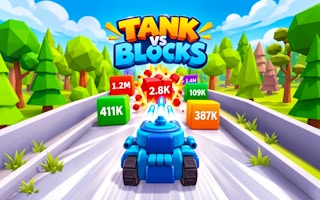
Tank vs Blocks places a blue tank on a forward-moving road filled with numbered blocks. Your main opening input is horizontal dragging: shift the tank across the road while it fires. The challenge is to choose a useful line before reaching the next row of obstacles. Moving sideways is not just cosmetic; it changes which blocks sit in front of your shots and where the tank approaches the row.
The opening level starts with a small set of upgrade choices, a coin balance, and a best-result display. Tap to start the run, then watch the tank and the numbered green blocks ahead. A deliberate drag from the center toward the right produces a visible sideways move and curved tracks behind the tank. In the opening run, a green block marked one shattered with a small reward indicator while the coin balance increased.
This game is a good fit for players who like making quick lane decisions with a simple pointer control. Begin by learning the relationship between your horizontal position and the line of fire. Upgrade planning comes after that. A stronger tank is useful only when you can read the next row and place it where the shots have a clear purpose.
Controls
Controls for Tank vs Blocks
- Horizontal drag
- Move the tank left or right across the road.
- Tap to Start
- Begin a run from the opening menu.
- Damage / Fire Rate
- Inspect the displayed coin price and next multiplier before purchasing.
Useful strategy
Make your next move count
- Choose the next route before the block row is close.
- Keep a useful firing line instead of sweeping without a target.
- Separate a missed shot line from an underpowered clear attempt.
- Read unlock labels before expecting an extra weapon to work.
Learn the drag before chasing progress
The start screen shows a horizontal finger cue. Place the pointer on the tank area, hold, and drag sideways to move. Start with one obvious direction change rather than a rapid zigzag. You should be able to identify the tank's new position relative to the road and to the blocks. The tracks provide another visible clue that the movement happened.
Firing occurs during the run, so the early task is aiming through position rather than pressing a separate shoot button. Watch the line of projectiles and the block directly ahead. If you move to the right, check whether that line now meets the intended right-side target. Steering and target selection should be one decision: choose the block or opening you want, then put the tank in its approach lane.
A drag that does not produce a visible move deserves a focus check. Begin inside the active game area instead of on the surrounding page. Use a broad, deliberate horizontal motion and inspect the result. Do not infer movement from the road advancing by itself; forward motion and your sideways input are different events. Once the steering is clear, smaller adjustments become easier to judge.
Read the next row early
Look ahead far enough to notice the next row before the tank reaches it. A numbered block is a target that may require sustained fire, while an open space is a possible route through the arrangement. Compare their positions before committing to a lane. Waiting until a row is immediately in front of the tank leaves less time to move and less opportunity for your shots to work.
Start with a low-numbered block when the layout gives you a clear choice. The opening one-value block provides an easy way to learn what destruction looks like: the block breaks rather than merely sliding down the screen, and a reward indicator appears. Use that feedback to calibrate the action. Do not assume every later block takes the same amount of time or offers the same reward.
The important question is whether the target is still intact as you approach it. If it remains visible, reassess the lane and any available opening. A large number on the cover art is not evidence that your starting tank can clear that block immediately. Read the current run, the available distance, and the actual projectile result. Avoid treating a visually dramatic lane as the best route without checking those details.
Give a target time to receive shots
A stable lane gives the firing stream a clear target. If you sweep constantly from edge to edge, shots may spread across several blocks without finishing the one that controls your route. Choose a target, hold a useful alignment long enough to see its response, then change lanes for a reason. This makes the relationship between steering and block damage easier to learn.
Stability does not mean refusing to move. If the next arrangement changes or a useful gap appears elsewhere, prepare a new line. Make that decision while the target row is still ahead. A gradual, purposeful adjustment is easier to follow than a last-second sweep whose endpoint you cannot judge. Check the tank's actual position after the move rather than relying only on where you dragged the pointer.
When a block shatters, look beyond the newly cleared spot. The next row may need a different approach. Treat each cleared block as an opportunity to read the road again, not an instruction to remain in the same lane indefinitely. A good rhythm is to identify a route, aim, confirm the result, and inspect what follows. That rhythm also reveals which situations your current upgrades struggle to handle.
Compare damage and firing rate
The opening upgrade menu separates Damage from Fire Rate. Both start at level zero with a displayed multiplier of one. The first Damage offer costs 100 coins and displays a next multiplier of 1.2; the first Fire Rate offer also costs 100 and displays 1.15. Read those as distinct improvements rather than assuming both buttons provide the same benefit because their price matches.
Damage concerns the strength of a shot, while firing rate concerns how frequently shots are produced. Which is more useful depends on what is slowing your run. If an aligned firing stream struggles to finish a target in the available approach, either type of improvement may be relevant, but compare the actual next offer and your current balance. Do not buy based only on the larger-looking label.
Coins earned during a run and the menu's upgrade price serve different roles. A small block reward teaches you how progress is recorded, but it does not necessarily make an upgrade affordable immediately. Check the total before selecting a purchase. After any improvement you deliberately choose, inspect the displayed level and multiplier before planning around it. Prices shown at the opening are not a promise that every later level costs the same.
Understand the extra menu options
The opening menu labels Missiles as locked until level four and Bolt as locked until level eight. These are future unlock prompts, not tools available to your starting tank. Keep the first session focused on horizontal aiming and ordinary firing. When a new tool becomes available, read its current instruction instead of guessing how it works from its name.
The TNT panel displays a progress value and a FREE button with a video symbol. Treat that as a separate optional interaction from the basic run. You can learn steering and numbered-block destruction without selecting it. A video-marked button should not be confused with the ordinary start button or with a coin-funded damage upgrade. Read the current prompt before choosing any optional offer.
The best-result display and level indicators help you track a session, but they do not replace looking at the road. A growing total can distract from an uncleared block directly ahead. Check the interface when you have a clear moment, then return your attention to the next route. Use results to compare attempts after you have understood what changed in your driving.
Diagnose a difficult attempt
If you feel that the tank is weak, first separate aiming from upgrade strength. Were the shots aligned with the intended block for most of its approach, or did the tank change lanes repeatedly? A missed target is a different problem from a target that received steady fire and remained intact. Fixing alignment costs no coins and gives you a clearer basis for deciding on an improvement.
If steering feels late, look farther ahead and choose a lane earlier. If the pointer motion feels imprecise, begin with larger deliberate moves and watch the tank's response before using small corrections. If rewards seem unclear, identify a single low-numbered target and observe its break. These focused checks are more useful than changing every part of your play at the same time.
Keep your next attempt simple: one early route choice, one stable firing line, and one planned adjustment for the following row. Once that sequence is repeatable, compare upgrades against the obstacle that still causes trouble. There is no need to claim a perfect build before learning the road. The practical goal is to make each run explain what your tank can currently clear and where your steering can improve.
Quick answers
Tank vs Blocks FAQ
Do I need a separate shoot key?
The opening run fires while the tank moves. The verified input is horizontal dragging to change its lane.
What do the first upgrades show?
Damage displays 100 coins for 1.2 and Fire Rate displays 100 for 1.15 at the opening level. Recheck current prices in your session.
Are Missiles available immediately?
The opening menu locks Missiles behind level four and Bolt behind level eight. Follow the prompts when those tools become available.
Game information
Game details
Play through the official GamePix publisher player. The external game may use cookies or display advertising under GamePix terms.
- Distributor and host
- GamePix
More about this game
Keep the break going