Cube Merge Shot
Shoot numbered cubes into matching values and keep the launcher clear as larger cubes form.
- Session
- Short score runs
- Controls
- Hold and drag to aim; release to shoot
- Best for
- Skill
Aim, shoot, merge
Cube Merge Shot
Hold and drag to aim; release to shoot
Play loads a game hosted by GamePix that may show ads and use cookies.
Provided by GamePix. Ads and cookies may load only after you press Play. Read the GamePix Privacy and Cookie Policy.
Aim toward a cube with the same number as your next shot.
How to play
How to Play Cube Merge Shot
Aim the current number cube into a useful lane, release to shoot, bring equal values into contact, and keep the growing field away from the red launcher line.
- 01
Read the number on the current cube and the NEXT preview before aiming. Locate every matching value already in the field and note which routes remain open from the launcher.
- 02
On desktop, hold the mouse button and drag left or right to choose the shot direction. On a touch screen, touch and drag horizontally to aim.
- 03
Release the mouse button or lift your finger to shoot. Follow the cube's path and watch how it contacts the existing group rather than preparing another move from the old layout.
- 04
When equal values touch, let the merge finish. Check whether the larger result can immediately meet another cube of the same new value and continue the chain.
- 05
Recheck the current cube, NEXT preview, Score, and open lanes after the movement settles. Choose a direct merge when available or place a value where a matching future cube can still reach it.
- 06
Keep the area above the red line clear. Avoid building one tall column toward the launcher, and favor merges that consolidate low-value cubes before the field becomes crowded.
About the game
Shoot matching number cubes into a controlled merge field
Cube Merge Shot combines an upward shooting game with number merging. A launcher at the bottom sends the current numbered cube into a tall playfield. When two cubes with the same number touch, they combine into a larger numbered cube. The immediate goal is to create useful contacts while preserving enough open space to keep firing.
The interface shows the current cube at the launcher and a NEXT preview, with Score and BEST at the top. A red line marks the area near the launcher that must stay clear. The official rule is simple: hold and drag left or right to aim, then release to shoot. The puzzle comes from choosing a lane that works for the current value without blocking the next one.
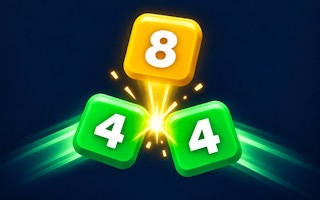
Merges can connect. In one early sequence, a launched 2 reached another 2 and formed a larger cube, which then met an existing 4 and produced an 8. The score rose as the contacts resolved, but that example is a lesson about position rather than a fixed opening or scoring formula. Read the live field, current cube, and preview each time you play.
Controls
Controls for Cube Merge Shot
- Hold and drag left or right
- Aim the current numbered cube on desktop.
- Release the mouse button
- Shoot the aimed cube into the field.
- Touch and drag left or right
- Aim on a mobile or tablet screen.
- Lift your finger
- Release the current cube on a touch screen.
Useful strategy
Preserve clear lanes for the current cube and the NEXT value
- Scan for an exposed equal value before every shot. A direct match usually gives the current cube a purpose and consolidates two occupied positions into one larger result.
- Use the NEXT preview to plan two values together. Do not place the current cube in the only lane the previewed value needs to reach its partner.
- Aim for clean contact rather than a narrow gap you cannot judge. A shot that lands beside the intended partner may add height without producing the merge you wanted.
- Keep matching low values on reachable faces of the cluster. Burying a 2 or 4 behind unrelated cubes can force several extra shots before it can merge.
- Look one result ahead. If two 2 cubes will create a 4, check whether an existing 4 is positioned where the new cube can touch it and continue the chain.
- Spread the field when no merge is available, but avoid scattering identical values to opposite sides with no route between them. Leave a visible reunion path.
- Watch the red line continuously. When cubes approach the launcher, prioritize an immediate nearby merge over a speculative chain that adds another unsupported cube.
- Let each collision resolve before choosing the next lane. A chain can change the height, width, and exposed values enough to make the previous plan obsolete.
Aim through lanes that stay useful after the shot
Begin at the launcher and trace the route toward the intended value. An open lane is more than a gap at the bottom; it needs enough width for the cube to travel into meaningful contact. If another cube blocks the approach, choose a different partner or use the current shot as a controlled placement instead of hoping it will pass through an uncertain opening.
Drag horizontally with a clear destination in mind. A small aiming change can alter which face of the cluster the cube reaches. When targeting an exposed equal value, favor the broad side that offers direct contact. Narrow angles near several unrelated cubes make the landing harder to predict and can create a new protruding column close to the launcher.
Think about the lane after the merge as well. Combining a pair changes two cubes into one larger value, but the result still occupies space and may become the next destination. A useful shot either creates an immediate match, exposes another number, or leaves a clean path for a future partner. Judge the settled result before reusing the same lane.
Use the current and NEXT cubes as a two-shot plan
The current cube determines what can merge now; the NEXT preview tells you which value needs access afterward. Find possible destinations for both before releasing. If the current cube has a direct partner and the next one has a separate open route, protect both lanes. If only the previewed value has a clear match, place the current cube where it will not close that opportunity.
When the two displayed values can support the same area, build them in sequence. The first shot might merge and expose a new surface, allowing the previewed cube to reach its own partner. This short plan is easier to adapt than imagining many future cubes whose values are not yet shown. After the first collision, confirm the second route still exists.
A placement shot should create a specific future option. Put an unmatched value on an exposed side where another copy can reach it, preferably without raising the tallest part of the field. Avoid sending it deep behind a larger cube merely to clear the launcher for one turn. The preview helps you distinguish temporary storage from a useful setup.
Build merge chains from known equal-value contacts
A chain begins when the result of one merge is already positioned to meet an equal larger cube. For example, joining two 2 cubes creates a 4; if that new 4 can touch an existing 4, another merge can produce an 8. The important preparation is the location of the existing 4, not simply the presence of several low numbers somewhere in the field.
Before shooting, name the first contact and the possible follow-up: current 2 to exposed 2, then resulting 4 toward nearby 4. If the second partner is separated by an unrelated cube, count only the first merge as dependable. A visible route makes a chain plausible; matching values on different sides do not guarantee they will connect.
Let motion confirm each stage. Cubes can contact and rearrange the exposed surface as a merge resolves. Watch the new number and its position before assuming the chain has finished. Score feedback can confirm progress, but it does not reveal a universal point formula. Use the field itself to decide whether another equal-value contact is available.
Protect the red-line area from an uneven pile
The official loss pressure is the pile moving too close to the launcher. Treat the red line as an early warning rather than waiting until the bottom area is packed. Track the lowest protruding cubes and the lanes they block. A field can look open near the top while one descending column removes most useful aiming choices below.
When space tightens, prioritize consolidation near the launcher side of the cluster. A direct equal-value merge can replace a pair with one larger result and reopen space around their contact. Avoid firing into the same crowded lane unless the shot has a clear matching destination. Repeated unmatched placements turn a local problem into a wall.
Recovery means restoring choices, not chasing the largest possible number. After a safety merge, scan both sides for newly exposed values and reopen more than one route if possible. One narrow lane can close after the next shot; two workable approaches let the current and previewed cubes reach different parts of the field without building another dangerous column.
Quick answers
Cube Merge Shot FAQ
How do you aim in Cube Merge Shot?
Hold the mouse button and drag left or right on desktop, or touch and drag horizontally on mobile. Release the button or lift your finger to shoot.
Which number cubes can merge?
Two cubes with the same number merge when they touch, creating a larger numbered cube. Unequal values can occupy space but do not make that equal-value merge.
How can one shot create a chain?
Aim an equal pair so its larger result can reach another cube with that new value. Two 2 cubes can form a 4, which may then merge with an exposed 4.
What does the NEXT display show?
It shows the value scheduled after the current cube. Use it to preserve a lane or exposed partner for the following shot before releasing the current one.
How do I keep the launcher area clear?
Avoid unmatched stacks near the red line, keep equal values reachable, and choose immediate consolidating merges when the lowest part of the field begins blocking your aiming lanes.
Is there a fixed score for every merge?
Use the live Score display to read each result. This guide does not assume a fixed formula; focus on equal-value contacts, useful chains, and preserving space for later shots.
Game information
Game details
Cube Merge Shot is developed by koyotap and provided through the GamePix-hosted player. The external player may display advertising and is governed by GamePix's privacy terms.
- Developer
- koyotap
- Distributor and host
- GamePix
More about this game
Keep the break going