Spiny Ninja
Swipe in four directions to guide a spiny runner across islands, collect coins, and avoid obstacles.
- Session
- Short swipe stages
- Controls
- Swipe left, right, up, or down
- Best for
- Casual
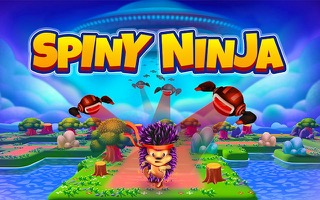
Swipe between tiny islands
Spiny Ninja
Swipe left, right, up, or down
Play loads a game hosted by GamePix that may show ads and use cookies.
Provided by GamePix. Ads and cookies may load only after you press Play. Read the GamePix Privacy and Cookie Policy.
Watch the next island and choose a direction with a safe landing.
How to play
How to Play Spiny Ninja
Read the next landing, swipe once in the correct direction, and let the runner settle before collecting the next coin or choosing another turn.
- 01
Press Play and select the open first stage. Wait for the countdown and the directional tutorial.
- 02
Study the runner’s current position, nearby rocks, island edges, visible coins, and the next connected landing.
- 03
Swipe left, right, up, or down in the direction of the safe path. With a mouse, drag a short clear line in that direction.
- 04
Allow the movement and camera shift to finish. Confirm where the runner landed instead of immediately repeating the previous swipe.
- 05
Collect coins that lie on safe routes, continue through the numbered stage, and use the pause button if you need to stop the run.
About the game
A compact swipe runner built around one deliberate direction at a time
Spiny Ninja places a small runner on narrow floating islands and asks for directional swipes. The opening tutorial explicitly demonstrates a swipe to the right and then a swipe down. Each accepted move sends the character toward a new landing area, and coins along the route add to the counter. The screen is portrait-shaped, which keeps the next portion of the path visible while limiting how much space is available for correction.
The challenge is less about constant movement and more about reading the current island before committing. Rocks, edges, turns, and the camera angle can make one direction safe and another direction fatal. A move completes quickly, so rapid repeated swipes can queue an action before you have understood the new position. Reliable play comes from a rhythm: land, find the next island, trace the path, swipe once, and reassess.
Controls
Controls for Spiny Ninja
- Touch
- Swipe left, right, up, or down to send the runner in that direction.
- Mouse
- Drag in a clear cardinal direction inside the game area.
- Pause
- Tap the pause button in the upper corner to stop the current run.
Useful strategy
Spiny Ninja tips for more reliable runs
- Use short, clean swipes rather than diagonal gestures.
- Wait for the camera to settle because the same screen direction may lead somewhere different after a turn.
- Choose the landing first and the coin second; a risky coin is not worth leaving the route.
- Trace the full movement lane, including rocks near the destination.
- Keep the input inside the portrait game area so the browser does not interpret the gesture.
- When two routes seem possible, prefer the one with a larger landing area until the controls feel familiar.
- After a failed move, remember the island shape and direction instead of repeating the same reflex.
- Treat the tutorial arrows as a control lesson only; later swipes must be chosen from the actual path.
Read geometry before chasing the coin
The runner may stand near a rock, an edge, or a narrow corner. Before swiping, identify the entire safe lane from the starting point to the destination. A coin can make one direction look attractive, but the landing area matters more. If the path ends at water or clips an obstacle, the coin does not make it safe.
Use stable landmarks. Note the side of the island, the nearest rock, and the direction of the next connected platform. These landmarks remain useful when the camera scrolls. A simple verbal cue such as “right past the rock” or “down to the wide island” can prevent an impulsive diagonal swipe.
The portrait view emphasizes the route ahead, but some connections enter from a side. Scan all four directions instead of assuming that forward on the screen is always correct. The first tutorial teaches cardinal gestures; it does not mean the stage follows one repeated pattern. Also separate the direction of the gesture from the apparent motion of scenery. As the camera follows the runner, islands can slide across the screen even though your next input still depends on the runner’s current connection. Wait until that movement stops, place the runner at the center of your mental map, and then name the destination. If a rock partly hides the path, trace the visible ground around it before deciding that the route continues. A coin at the far edge may confirm the intended lane, but it should support the geometry you can see rather than replace it. Before swiping, make sure the destination includes solid ground beyond the collectible, since the character must finish the motion safely after the coin is counted.
Make one clear input and verify the result
A directional game depends on gesture clarity. Start the drag near the runner or open play area, move decisively along one axis, and release. A short horizontal or vertical gesture is easier for the game to interpret than a long diagonal motion. With touch, keep the finger path inside the game frame.
Avoid stacking inputs. If you swipe twice before the first movement finishes, the second action may execute from a new location you have not examined. The safer rhythm is input, movement, landing, scan. This small pause improves accuracy more than trying to maintain constant speed.
If the game ignores a gesture, do not repeat it several times rapidly. Return to the center of the play area and make one cleaner swipe. Repeated attempts can turn one missed input into an unwanted queued move. The coin counter and character position show whether the action registered.
Choose wide landings while learning a stage
A wide destination gives more visual information and usually leaves more than one follow-up option. Narrow corners demand precise reading and can force an immediate turn. While learning, use the route that offers a broad landing unless a coin or obstacle clearly establishes another required path.
Once on a new island, orient from the character rather than from the old camera. Find the nearest edge and the next visible connection. A path that was visually “down” before scrolling may now appear beside the runner. Rebuilding the orientation after every move avoids carrying an outdated direction into the next gesture.
Coins can mark useful routes, but they are not a promise that every approach is safe. Some may sit near rocks or island boundaries. Collect them when the entry and landing are both clear. If the stage allows another route, survival and route knowledge have more value than one uncertain pickup.
Turn failures into a route map
A stage becomes easier when you remember it as a sequence of landmarks and directions. Record only the important turns: first right, then down at the rock, then the wide landing. A compact route is easier to replay than a detailed image of every tree and flower.
When a run ends, identify whether the mistake came from reading the wrong destination, swiping diagonally, acting before the camera settled, or choosing a coin over safety. Each cause has a different fix. Changing the route will not help if the real issue was an unclear gesture.
On the next attempt, slow down one move before the failure point. Confirm the landmark, make the intended swipe, and watch the complete landing. Once that section is reliable, resume a natural pace. This focused repetition builds consistency without turning the whole stage into a rushed sequence.
Quick answers
Spiny Ninja FAQ
How do I move in Spiny Ninja?
Swipe left, right, up, or down. With a mouse, drag in the intended direction.
What does the opening tutorial teach?
The opening prompts demonstrate a swipe right followed by a swipe down.
Should I swipe repeatedly?
No. Let each move and camera shift finish before choosing the next direction.
What do the coins do?
Coins add to the run counter when the runner collects them along the route.
Is Spiny Ninja suitable for mobile?
The game uses a portrait layout and directional touch swipes.
Game information
Game details
Spiny Ninja is provided through the GamePix-hosted player.
- Distributor and host
- GamePix
More about this game
Keep the break going