Laser Strike
Aim a laser through the scene, turn its path with reflectors, and find the target.
- Session
- Short puzzle levels
- Controls
- Click a laser cannon or reflective object
- Best for
- Logic
Landscape gives you more room
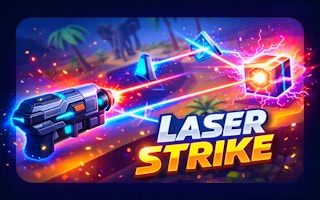
Redirect the beam
Laser Strike
Click a laser cannon or reflective object
Play loads a game hosted by GamePix that may show ads and use cookies.
Provided by GamePix. Ads and cookies may load only after you press Play. Read the GamePix Privacy and Cookie Policy.
Open the first unlocked level and find the cannon, target, and possible reflectors.
How to play
How to Play Laser Strike
Open an unlocked level, trace the current beam, and alter one part of its route at a time.
- 01
Choose an unlocked level and locate the laser source, the target, and any possible reflective pieces.
- 02
Click a cannon or interactive object and watch whether the visible beam changes direction or length.
- 03
Use the on-screen view arrows when an object or connection is hidden behind the scene.
- 04
Follow the beam from source to first contact point. Correct that segment before worrying about later turns.
- 05
When a path fails, change one piece and compare the new route with the previous one.
About the game
Find a route for the laser
Laser Strike presents a small three-dimensional scene with a laser source, objects that can affect its path, and a target to reach. The first useful question is not which object to click. It is where the current beam travels and where it stops. A visible line from the cannon gives you a starting route. Inspect that route, identify its first obstruction or turn, and then look for an interactive object that could change just that segment.
The official listing describes laser cannons, reflective pipes, and camera rotation. Those are clues to how to explore a level, but a new scene may reveal only part of the route from one angle. Treat each adjustment as a small experiment. Change one object, observe the new path, and decide whether the beam moved closer to the target. Aiming by repeated random clicks is harder to learn from because you lose track of which change created which result.
Controls
Controls for Laser Strike
- Mouse click
- Interact with laser equipment and other selectable puzzle objects.
- On-screen arrows
- Inspect the scene from another view when the route is hard to read.
- Level selection
- Start an unlocked puzzle from the level screen.
Useful strategy
Make each beam change informative
- Trace the beam from its source rather than starting at the target.
- Look for the first point where the beam misses the intended route.
- Rotate the view to inspect occluded objects before assuming a route is impossible.
- Change one object at a time so you can tell which adjustment helped.
- If a beam passes near the target, inspect the last turn instead of resetting the whole path.
- Use a failed path to rule out one direction, then test a different reflector position.
Read the whole scene before changing a piece
Start by separating what you know from what you are guessing. The source shows where the beam begins. The target shows where it must eventually arrive. The visible laser shows which portion of the route already works. Reflective objects and obstacles indicate possible turns, but their purpose may be unclear until you inspect their position. This simple inventory prevents a common mistake: clicking the most colorful object because it stands out, even when it is not connected to the current beam.
A three-dimensional scene can hide an important piece behind scenery or another device. The on-screen view arrows are useful for checking whether two objects really line up. A reflector that appears directly in front of the target from one view may be offset in depth. Rotate, check the relationship, and then return to the beam. Changing the camera helps you observe the puzzle; it is not itself proof that the laser path has changed. Look for an actual difference in the line before judging an adjustment.
Identify the first place the current path goes wrong. If the beam ends before reaching a reflector, focus on the source or the object immediately after it. If it reaches a reflector but exits away from the target, focus on that turn. If the early path reaches the right side of the scene, leave it alone while you inspect the last obstacle. Solving a route one segment at a time is easier than trying to hold every angle in memory at once.
Test a route without losing your place
After selecting a device, pause long enough to see the new beam. Ask whether it now touches a useful object, passes through empty space, or stops against scenery. These are different results. Contact with a useful reflector suggests that the early route may be sound. An empty path suggests the previous turn needs revision. A collision suggests you should inspect depth and orientation from another view. The aim is to learn one fact from every action, even when the target stays dark.
Try to keep the working part of a path intact. Suppose the beam reliably reaches one pipe but the outgoing line misses the target. Repeatedly changing the cannon erases your useful progress. Work from the last successful contact toward the target instead. If a late reflector cannot produce a useful outgoing direction, then reconsider the object before it. Moving backward only when necessary reduces the number of combinations you need to test.
If a click appears to do nothing, first confirm that the object is interactive and the game is active. A decorative model and an adjustable component can look similar. Check for a changed beam, highlight, or object position. Do not infer that an invisible change occurred. Rotate the view and inspect the object from another angle, then try an obviously selectable device. If the game is paused or on a level menu, resume the puzzle before testing another adjustment.
Use reflections as route checkpoints
A reflective pipe is helpful only if the beam reaches it and leaves along a useful line. Check both sides of that interaction. A pipe may appear correctly aimed toward the target, but if the incoming beam misses it, its outgoing direction does not matter yet. Conversely, a beam may reach a pipe cleanly while the pipe sends it into empty space. Solve the incoming connection first, then adjust the outgoing connection. That order makes each device a checkpoint rather than a source of confusion.
When several reflectors are visible, avoid assuming that every one belongs in the final route. Some may be alternatives or distractions. Use the geometry in front of you: which reflector is reachable from the current line, and which could plausibly send light toward the next useful object? The official description establishes that redirection matters, but it does not give a universal reflector sequence. A route that works in one level should not be copied blindly into another scene.
It is tempting to focus on the bright target and click objects near it. Instead, work forward from the source, because light cannot skip a broken connection. Once the beam reaches a later object, switch your attention to that section. If it passes very close to the target, check whether the final line is at the right depth as well as the right apparent angle. A camera turn can reveal why a near miss looked like a hit from the original view.
Recover when a level stops making sense
When repeated changes produce no visible progress, reconstruct the last clear state in your mind. Which object did the beam reach before you began experimenting? Which click made it stop reaching that object? Return to that part of the route and test a different direction. This is more useful than restarting merely because the scene feels busy. A reset may be sensible after many changes, but preserve the clue you gained: the particular turn or connection that failed.
Look for a hidden assumption that may be wrong. A bright object may be scenery, not a reflector. A pipe may be farther back than it appears. A laser source may need adjustment before any reflector can matter. Rotate the view and compare these positions. If the same beam remains after several clicks, consider whether you are clicking outside the interactive area. The strongest evidence is the path on screen, not the fact that a click was sent.
A good short attempt has a clear purpose: inspect the scene, establish one reliable connection, then extend it. Do not measure success only by a completed level. Finding which device controls a segment is real puzzle progress. On your next attempt, reproduce the working opening quickly and devote attention to the unresolved turn. That habit gives Laser Strike a methodical rhythm even when its low-poly scenes make the exact geometry initially hard to read.
Quick answers
Laser Strike FAQ
What is the goal in Laser Strike?
Guide the laser from its source to the target by finding and adjusting a usable route through the scene.
How do I control it?
The official listing specifies mouse play. Click interactive equipment and use the on-screen view arrows to inspect the scene.
Why is my beam missing the target?
Trace it from the source to the first wrong turn or stop. Correct that segment before changing later objects.
Does changing the view solve the puzzle?
Changing the view helps reveal alignment and hidden objects; judge progress by the visible beam path.
Game information
Game details
Laser Strike runs in the official GamePix-hosted player. Airy Arcade does not host the game code.
- Distributor and host
- GamePix
More about this game
Keep the break going
Similar games
Rotate the complete network
Turnline: Relaxing Puzzle
Rotate line tiles, connect the square and circle endpoints, and finish every required branch.
Collect, sell, upgrade
Magnet Master 3D
Sweep scrap into a magnet, unload at the SELL depot, and spend virtual cash on useful upgrades.