Just Another Alien Invasion
Aim meteors, spin a populated planet, and deepen craters toward its core.
- Session
- Flexible short sessions
- Controls
- Click the planet to drop a meteor
- Best for
- Casual
Choose your next impact
Just Another Alien Invasion
Click the planet to drop a meteor
Play loads a game hosted by GamePix that may show ads and use cookies.
Provided by GamePix. Ads and cookies may load only after you press Play. Read the GamePix Privacy and Cookie Policy.
Choose Play and aim at a visible city.
How to play
How to Play Just Another Alien Invasion
Aim deliberately, inspect the impact, and decide whether to deepen the hole or reveal a fresh region.
- 01
Choose Play for the meteor tutorial and weapon progression.
- 02
Click a visible city and look for the crater and changing progress displays.
- 03
Hit the same hole again when the tutorial asks you to dig deeper.
- 04
Drag the planet to reveal another side; use the wheel to adjust your view.
- 05
Inspect the next weapon threshold and follow the player’s current defensive prompts.
About the game
Just Another Alien Invasion
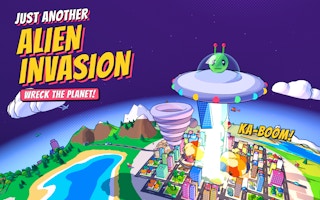
Just Another Alien Invasion puts a small saucer above a planet filled with cities, roads, and moving vehicles. You choose where the next meteor lands. The opening lesson is direct: strike a city, inspect the crater, and hit the same hole again to dig farther into the planet. Destruction is something you can aim and examine, rather than a number that grows without your involvement.
The planet is round and rotatable, so the surface currently facing you is only part of the available target area. Drag to reveal another side and use the wheel to change your view. A useful first session alternates between precise strikes and deliberate rotation. This makes it easier to understand which places you have damaged, which cities remain, and whether the next click is aimed at a fresh target or an existing hole.
The menu separates Play, Sandbox, and Explore. Play introduces missiles and the saucer shield alongside planet destruction. Sandbox offers the weapons from the beginning without missiles, while Explore presents a peaceful planet and opportunities to follow its vehicles. Choose the mode according to the task you want: unlocking tools under pressure, experimenting freely, or looking around. The guide below focuses on the meteor opening in Play.
Controls
Controls for Just Another Alien Invasion
- Click the planet
- Drop the opening Meteor at the chosen surface point.
- Drag the planet
- Rotate it to inspect other regions.
- Mouse wheel
- Zoom the view for smaller targets.
- Tap vehicles
- Interact with visible planes, ships, and cars as prompted.
Useful strategy
Make your next move count
- Keep the view steady when repeating a crater strike.
- Use score, wrecked percentage, and city progress as separate clues.
- Aim at one recognizable landmark before rotating away.
- Try a newly unlocked tool deliberately before relying on it.
Your first useful meteor
The tutorial asks you to hit a city. Move the pointer onto the visible city itself rather than the empty space beside the globe, then click once. A successful opening strike leaves a visible crater and changes the score and wrecked percentage. In the opening Doodleton example, a meteor raised the score from zero to 2,120 and the wrecked display from zero to two percent. Treat those as the result of that particular strike, not a fixed reward promised for every click.
After the impact, let the scene settle enough to identify the damaged spot. The tutorial then directs you toward the same hole. This is a different task from spreading damage across untouched land: repeated impacts deepen a crater toward the core. Keep the camera steady while learning this distinction. Rotating immediately after every meteor makes the hole harder to locate and turns a precise follow-up into guesswork.
If you click and cannot identify an impact, check where the planet is in relation to the pointer. At a distant zoom, a city occupies very little screen space. Zoom closer before trying a small target again. If the surrounding webpage reacts instead, click inside the game to give it focus. A single carefully placed meteor tells you more than several hurried clicks whose landing points you cannot follow.
Digging down or spreading out
Two practical approaches are available at the beginning. You can revisit a crater to deepen it, or rotate toward an untouched region and spread destruction. Neither action is interchangeable with the other. The tutorial's hole instruction gives you a clear reason to repeat a strike, while the city counter gives you a reason to inspect different parts of the surface. Decide which task you are pursuing before moving the view.
For a digging attempt, choose a crater that is easy to recognize beside a road or city label. Keep that landmark visible, place the pointer near the existing opening, and compare the hole after another hit. If the impact lands next to it, adjust the pointer rather than assuming the hole became deeper. This approach uses the scene itself to judge accuracy and avoids confusing neighboring damage with progress down the same channel.
For a surface survey, rotate in a controlled direction and stop when a new city or vehicle route comes into view. Make one or two purposeful strikes, then continue the survey. You do not need to memorize a complete globe at once. Remembering a few landmarks is enough to return to a useful area. When a region looks familiar, check its damage before spending more attention on it.
Read the separate progress displays
The score, wrecked percentage, city counter, and secrets counter describe different parts of the session. An early city strike can increase the score and wrecked percentage while the city tally still shows zero out of nine. Do not conclude that the click failed simply because every display did not move together. Inspect the visible crater and the specific objective you are trying to complete.
The menu shows twelve secrets, but a secret counter is not an instruction for finding them. Explore the surface and pay attention to unusual details without expecting every ordinary meteor to reveal one. The opening lesson does not provide a complete secret route, so concentrate on learning the controls before searching for a full collection. Discoveries are more satisfying when you can connect them with the interaction that produced them.
Vehicles provide smaller moving targets. The player explicitly invites taps on planes, ships, and cars as well as strikes on the planet. Begin with a slow, easy-to-follow target and keep the pointer where it is going, rather than where it was a moment ago. If a target is too small to distinguish, change your zoom. Avoid repeatedly rotating and zooming while trying to judge the same shot.
Plan around the weapon thresholds
Meteor is available at the start. The weapon bar then displays Laser at four percent, Meteor Shower at ten, Space Hammer at seventeen, Tornado at twenty-four, Tractor Beam at thirty-one, Storm at thirty-eight, Earthquake at forty-six, Black Hole at fifty-four, and Mega Drill at sixty-two. These labels give you a near-term progression target without requiring you to understand every later tool immediately.
Work toward the next threshold instead of thinking about all the locked weapons at once. At two percent wrecked, for example, the next visible milestone is the four-percent Laser label. Continue with deliberate meteor strikes and check when the button becomes available. A new name does not tell you its exact range, timing, or best use. Read the current player prompt and observe the first use before building a strategy around it.
The numbered weapon bar runs from one through nine and then zero. Its displayed numbers help you locate a tool consistently, but the safest starting interaction is to use the visible controls and their prompts. Do not mistake a locked button for an input failure. If a threshold has not been reached, keep using an available weapon or choose Sandbox from the menu for the mode that offers the full set at the beginning.
Stay oriented under pressure
Play's menu description introduces incoming missiles and a shield protecting the saucer. That adds an attention task to planet targeting. Leave enough view around the saucer to notice the game's threat prompts, and follow the shield instruction when it appears. A very close inspection of a crater is useful for aiming, but it can draw your attention away from other events in the scene.
Separate learning from chasing a high score. First learn one repeatable action: land a meteor on an intended spot and recognize its result. Then add planet rotation, smaller moving targets, and whichever defensive interaction the player asks for. Trying to master every tool immediately makes it harder to identify why a particular attempt went wrong. The early meteor remains a useful reference point as the scene becomes busier.
When the planet has become heavily marked, use its remaining landmarks to choose a fresh task. A damaged city, an untouched coast, and an existing deep crater suggest different next actions. Pick one rather than clicking wherever the pointer happens to rest. The game rewards curiosity, but a clear local objective also helps you understand the effect of a newly available weapon.
Quick answers
Just Another Alien Invasion FAQ
Why did my city counter stay at zero?
A damaging strike can change score and wrecked percentage before the city tally changes. Read the crater and the separate displays.
Which mode removes missile pressure?
The menu describes Sandbox as offering all weapons without missiles. Explore is the peaceful sightseeing option.
How do I dig toward the core?
The opening tutorial directs repeated meteor hits into the same hole. Keep that crater visible and check where each impact lands.
Game information
Game details
Play through the official GamePix publisher player. The external game may use cookies or display advertising under GamePix terms.
- Distributor and host
- GamePix
More about this game
Keep the break going