Dice & Slash
Use a visible five-die hand to attack a chapter enemy, then choose a skill after the win.
- Session
- Flexible short sessions
- Controls
- Click Attack after reading the dice hand
- Best for
- Strategy
Roll, read, attack
Dice & Slash
Click Attack after reading the dice hand
Play loads a game hosted by GamePix that may show ads and use cookies.
Provided by GamePix. Ads and cookies may load only after you press Play. Read the GamePix Privacy and Cookie Policy.
Start the first chapter and read the dice before attacking.
How to play
How to Play Dice & Slash
Read the visible dice and health values before each attack.
- 01
Press Play, then check the chapter, enemy health, hero health, and five dice.
- 02
Look for the hand label and displayed attack value instead of trying to infer damage from a single die.
- 03
Press Attack once and wait for the battle result to resolve.
- 04
If skill choices appear, compare their in-game descriptions before selecting.
About the game
Dice & Slash
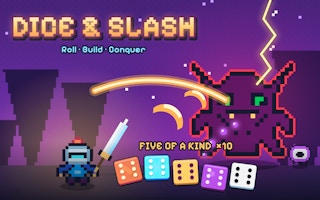
Dice & Slash presents a small hero, an enemy, and five visible dice as the decision point of a battle. In the observed opening, the player began Chapter 1 at level 1 with 100/100 health while a slime had 48 health. The dice display showed a five-of-a-kind result and an attack value of 130. Pressing Attack defeated that enemy and brought up a selection of skills. This makes the immediate loop clear: read the hand, commit the attack, and then read the offered change before continuing.
The title screen and dice art suggest many future combinations, but this guide stays with what the current player actually showed. The observed five-of-a-kind label carried an x10 marker; it is a label on that hand, not proof of the full scoring formula for every roll. A later overlay offered Storm Die, Life Die, and Extra Chance with individual descriptions. Compare the descriptions shown in your session rather than assuming an upgrade always has the same effect.
For a first attempt, treat the battle panel as a readable decision screen. Note your health, the opponent's health, the displayed damage value, and the dice pattern before pressing Attack. After the result animates, pause on the skill overlay. The next useful decision depends on whether you want to protect a run, change dice behavior, or take more chances; the actual offered wording should settle that choice.
Controls
Controls for Dice & Slash
- Click or tap Play
- Enter the chapter battle.
- Click or tap Attack
- Commit the currently displayed dice hand against the enemy.
- Click or tap a skill choice
- Choose one offered post-battle change after reading its current description.
Useful strategy
Play with a clear next move
- Compare the displayed attack value with enemy health before committing.
- Watch the result animation finish before trying another control.
- Treat one successful five-of-a-kind as an example, not the guaranteed next hand.
- Read the specific skill description before choosing a permanent-looking option.
Orient yourself on the battle screen
The first observed fight was Chapter 1, level 1. The hero health read 100/100, and the slime's health read 48. That difference matters because you can compare the displayed attack strength with a concrete target. The screen is small, so identify each number by its label and position before clicking. A fast glance at a colorful die face is less useful than knowing what the current hand is expected to do.
Five dice sit near the attack control. In the observed state, the hand carried a "Five of a Kind x10" label and showed 130 attack. Those are the values that justified pressing Attack against a 48-health opponent. Do not generalize the x10 label into an invented dice equation: the game may combine hand rank, upgrades, and other effects in ways this single encounter cannot reveal.
The chapter and level labels are also navigation feedback. A later screen after the successful hit showed Chapter 1, level 8 and six coins along with a skill overlay. That is the observed progression display, not a claim that every intermediate fight was manually played. If a future screen jumps or animates quickly, read its current label anew rather than assuming you know which level is active.
Commit a deliberate first attack
When the Attack button is available, first read the current enemy health. Then compare it with the displayed attack value. If your attack is clearly above the enemy's remaining health, it is reasonable to expect a decisive result, as in the observed opening. If not, the same comparison tells you to watch your own health and prepare for another turn rather than treating every button press as a guaranteed win.
Click Attack once and let the animation settle. During the observed test, the slime disappeared and a later skill-choice screen appeared. The important proof is the enemy's defeat after the button press, not simply that the iframe loaded or the menu opened. For your own run, verify the enemy health or battle state actually changes before assuming the click was accepted.
If nothing appears to happen immediately, avoid repeated rapid presses. The game may be completing an animation or waiting for a result to render. Give the screen a moment, then look for a changed health value, a defeated enemy, a new chapter label, or a skill overlay. Only then decide whether another input is needed. This makes the cause of progress clear.
Read dice outcomes without inventing a formula
A five-of-a-kind is easy to recognize because all five dice show the same face. In the observed hand it was explicitly named and paired with x10. That is enough to explain what the player saw, but it does not establish how other hands rank or how often the game produces them. Use the game's own hand label and attack number whenever they appear.
The useful question is practical: what does this hand let you do against the current opponent? A strong displayed value against a low-health enemy supports attacking confidently. A smaller value asks for attention to the next turn and your own health. You do not need to reverse engineer a probability table to make that first decision. The visible panel already gives the immediate comparison.
Do not assume every future board starts with a powerful match. If the dice change after progression, evaluate the new pattern and displayed value. The title art advertises rolling, building, and conquering, but those words are a theme rather than a complete instruction manual. Let the live interface tell you whether a roll, attack, or skill choice is currently available.
Choose a skill for the problem in front of you
After the observed opening victory, the overlay displayed Storm Die, Life Die, and Extra Chance as three choices. Their presence confirms that the run can offer a post-battle choice. It does not prove the full upgrade pool, how long a selected effect lasts, or which choice is universally best. Read each description on the current overlay before clicking.
Make a short comparison against the state you can see. If health has fallen, a life-related description may matter more to you than an aggressive option. If health is comfortable but attacks are weak, a dice-related change may be more interesting. These are decision questions, not claims about the exact effect of the named skills; the in-game wording supplies that missing detail.
Do not choose by the most dramatic name alone. "Storm" sounds offensive and "Extra Chance" sounds flexible, but names can hide conditions. Open or inspect each card's description, then decide what you want to improve for the next encounter. Once selected, recheck the battle panel for the resulting dice and health display rather than assuming the benefit appeared exactly as imagined.
Handle a weak turn or confusing transition
If a later hand looks weak, separate uncertainty about scoring from uncertainty about input. The displayed attack number tells you what the game currently estimates; the die faces tell you the pattern that produced it. Both are more reliable than remembering the earlier 130 result. Against a sturdier enemy, look at your remaining health before pressing Attack so you understand the risk of needing another turn.
If the level label changes sooner than expected, pause and read the screen. The observed test moved from a level-1 slime defeat to a level-8 display with a skill overlay after animation. This may reflect rapid game progression or a display transition, but a single observation does not justify a detailed chapter map. Continue from the visible state, not from a guessed sequence of missing fights.
On a narrow screen, make sure the button you press is the current battle control rather than a card behind an overlay. Wait until an animation or choice screen is stable. If the game offers a skill, make that choice before trying to attack again. This simple order prevents uncertain inputs from obscuring what actually advanced the run.
Plan a useful short session
One short session can answer three concrete questions: which hand did you receive, what attack value did the game show, and what happened after you committed it? Record those mentally rather than chasing every possible die combination immediately. This helps you recognize whether a later upgrade made a visible difference, while avoiding false precision about unobserved formulas.
Use the first enemy as an interface lesson. It had only 48 health in the observed opening, so the 130 attack value produced a decisive hit. A future enemy may have a different health total; always refresh the comparison. The same habit works even if the dice art or skill pool changes, because it focuses on information that is actually on the battle screen.
Stop at a stable state if you need a break: after a battle result or after reading a skill choice. A half-finished animation is a poor point from which to infer progress. When you return, identify the current chapter, health, dice hand, and available control. The game is most understandable when each attack and each upgrade is treated as a separate decision.
Quick answers
Dice & Slash FAQ
What happened in the observed first fight?
The displayed five-of-a-kind hand showed 130 attack against a 48-health slime. One Attack press defeated the slime and later showed a skill selection.
Can I rely on five of a kind every time?
No. Only one displayed hand was observed. Read the current dice and attack value for each turn.
Which skill is best?
The observed overlay offered Storm Die, Life Die, and Extra Chance. Compare the descriptions shown in your current run and your health or attack needs before choosing.
Game information
Game details
This game runs in the official GamePix publisher player. The external game may use cookies or show advertising under GamePix terms.
- Distributor and host
- GamePix
More about this game
Keep the break going