Arrows
Untangle a colorful arrow puzzle by clearing the paths in the right order.
- Session
- At your pace
- Controls
- Click or tap an arrow
- Best for
- Relaxed
Find the way out
Arrows
Click or tap an arrow
Play loads a game hosted by Playgama that may show ads and use cookies.
Provided by Playgama. Ads and cookies may load only after you press Play. Read the Playgama Privacy and Cookie Policy.
Follow each arrowhead and clear the pieces with an open path out.
How to play
How to Play Arrows
Select arrows whose routes are open, let them travel in the direction of their pointed ends, and use each cleared path to reveal the next safe move.
- 01
Study the board before selecting anything. Separate the colored shapes, find their pointed ends, and note which direction each candidate faces.
- 02
Look outward from an arrowhead. If another piece occupies that direction, treat the arrow as blocked for now. Search the edges for a piece pointing into open space.
- 03
Click or tap a clearly available arrow. When it leaves, use the result as confirmation that you read its direction and blockers correctly.
- 04
Rescan the changed area, then glance across the rest of the board. One removal can make several relationships easier to see, so choose the next move from the new position.
- 05
If a chosen arrow does not leave cleanly, identify the first piece in its way. Check where that blocker points and work outward until you find an arrow with an open route.
About the game
Untangle a picture made from moving arrows
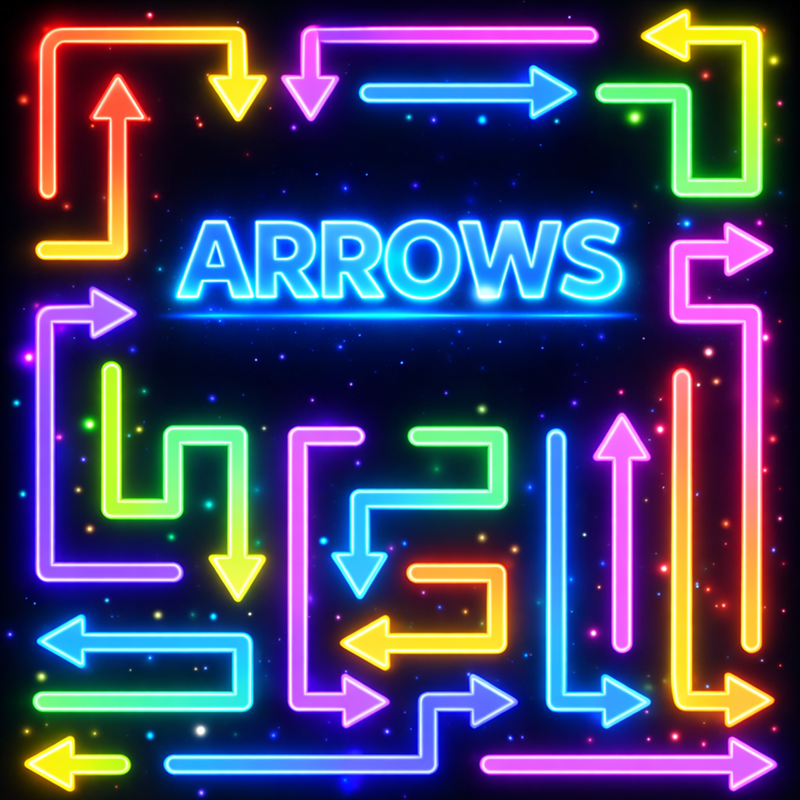
Arrows is a visual direction puzzle from Cosmos Pixel Games. Each board places colorful straight and curved arrows against a dark background, arranging their lines into a compact pattern. Your task is to remove the arrows in a workable order. An arrow leaves in the direction shown by its pointed end, but a piece in that direction can block the move.
The challenge is reading a layered drawing as separate pieces. Color helps you follow one arrow through the pattern, while its arrowhead establishes the direction you need to check. Trace the colored shape only to identify the correct pointed end, then look outward from that point for a blocker.
Every successful removal changes the puzzle. Empty space can release another arrow or make a crowded part of the pattern easier to read. Pause after each move and judge the current arrangement instead of clicking through a plan formed on the original board.
Controls
Controls for Arrows
- Mouse click
- Select one arrow and attempt to send it along the direction shown by its pointed end.
- Touch tap
- Select one arrow on a phone or tablet using the same direction-and-blocker rule.
Useful strategy
Read the pattern before committing to a move
- Begin at the outside of the pattern. Arrowheads facing open space are faster to verify because fewer pieces can stand between the point and the edge.
- Follow the color continuously from tail to tip. Where several curves sit close together, jumping visually from one colored segment to another can make you assign the wrong arrowhead to a body.
- Treat a blocked arrow as a useful clue. The first piece in its route tells you what must be removed earlier, turning a crowded picture into a smaller dependency question.
- After every successful move, inspect the cleared space and sweep all four sides. A newly available arrow may point through that gap from a direction you were not watching.
- Prefer a move whose forward direction you can describe over one that merely looks exposed. A small opening beside an arrow is irrelevant if another piece stands ahead of its point.
- After a poor choice, pause before clicking again. Rebuild the local picture, find the actual blocker, and change the earliest uncertain assumption in your sequence.
How to read straight and curved arrows
A straight arrow is quick to parse: locate the pointed end and scan forward in that direction. Curved arrows need a slower identification pass. Follow one colored shape until you reach its arrowhead, taking care not to jump onto a neighboring piece where the pattern becomes crowded.
The arrowhead determines the direction to check. Once you know which point belongs to the selected shape, look outward from it and note any piece standing in the way. The curve helps identify the arrow as one object; it does not change the basic need to inspect the direction indicated by the point.
Color is an identification aid, not a matching task. Use it to separate neighboring shapes, then switch attention to direction: which way does this arrow point, is that space open, and which blocker would need to leave first?
Turn blockers into a removal order
When an arrow is blocked, name the first piece that prevents it from leaving and inspect that second arrow instead. If the blocker also faces an occupied direction, repeat the check. The chain should lead toward an open move, which becomes the practical starting point for unwinding the group.
For example, suppose a blue arrow points toward an orange arrow, while orange points toward a green arrow with open space ahead. This is a reasoning example, not a board solution: try green first, reconsider orange, then return to blue. Working backward replaces a guess with a dependency order.
When several arrows look open, choose a removal that makes the crowded area clearer. Certainty still comes first. Any verified departure reduces the number of shapes you must track, so a simple edge move can be better than an ambitious central guess.
Scan a dense board in manageable regions
A full-board stare can make every curve compete for attention. Divide the picture into top, right, bottom, left, and center. In each outer region, look for arrowheads facing open space and follow their colors only far enough to identify the complete pieces. This limits the number of candidates you compare at once.
After checking the edges, inspect the center for arrows whose removal could simplify several nearby shapes. Do not select a central piece just because it looks important. Find its point, check the direction ahead, and return to an easier edge candidate if the blockers remain unclear.
Repeat the regional sweep after each departure. A shape that seemed part of the left cluster may become the clearest top candidate once another arrow leaves. Regions are an attention tool that helps you notice the changed pattern.
Recover by observing the changed position
A blocked attempt usually points to a specific reading error. You may have followed the wrong color, overlooked a piece ahead, or assumed that being near an edge guaranteed an exit. Retrace the selected shape to its point and locate the first blocker in that direction before trying another move.
If the board feels harder after several moves, reset your attention before resetting the game. Look away briefly, then scan the outside points and inspect only two or three candidates. This fresh pass helps when nearby curves have blurred together in your earlier mental picture.
Leaving the embedded player or reloading may discard the current position or other progress, so use a refresh only when necessary. After restarting, identify the first arrow you misread and verify its blocker before repeating the sequence.
Which arrow puzzle are you playing?
Several browser games use “Arrows” or a similar name, but their rules are not interchangeable. This page covers the Playgama title developed by Cosmos Pixel Games. Its board uses colorful straight and curved arrows on a dark background, and the task is to select pieces whose indicated directions are open.
Airy Arcade also has Arrow Escape, a parking puzzle with top-down cars. Its dependency idea is related, but its visual language differs. In Arrows, identify colored arrow shapes and points; in Arrow Escape, inspect each car’s front bumper and straight lane.
If another game shows rotating arrows, matching colors, or a reflex challenge under a similar title, do not carry those instructions here. Use what this board shows: locate the point, check that direction for an obstruction, and select an arrow when the way appears open.
Quick answers
Arrows FAQ
What is the goal in Arrows?
Remove the colorful arrows from the board in an order that keeps their directional paths open. Each successful departure simplifies the pattern and can free another piece.
How do you know which way an arrow will move?
Follow the arrow’s colored body to its pointed end. The point shows the direction of travel. For a curved piece, trace the full bend rather than judging direction from one short segment.
Why does an arrow fail to leave?
Its required route is obstructed by another piece. Find the first arrow in that path, inspect where the blocker points, and remove an available endpoint of the dependency chain first.
What should you check after removing an arrow?
Inspect the gap it created, trace any arrows pointing through that space, and scan the outer edges again. The best next move may appear in a different part of the pattern.
Can you play Arrows with touch controls?
Yes. Use a mouse click on desktop or tap an arrow on a touch screen. Both inputs select a piece; the puzzle itself determines whether its route is open.
Is Arrows the same game as Arrow Escape?
No. This Arrows game uses colorful straight and curved arrow pieces. Arrow Escape on Airy Arcade is a separate parking puzzle that uses cars moving along straight lanes.
Will reloading keep the current puzzle position?
Do not rely on it. Leaving or reloading the embedded game may lose the current position or other progress, so finish the active puzzle when possible and use a refresh only when necessary.
Game information
Game details
Arrows is developed by Cosmos Pixel Games and provided through the Playgama-hosted player. The external player may display advertising and is governed by Playgama’s privacy terms.
- Developer
- Cosmos Pixel Games
- Distributor and host
- Playgama
More about this game
Keep the break going