Cogwalk
Build one command strip for a crew of robots and use walls to synchronize their routes.
- Session
- Short logic levels
- Controls
- Space / W / Up to add a step
- Best for
- Strategy
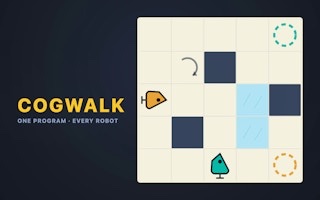
Program every robot
Cogwalk
Space / W / Up to add a step
Play loads a game hosted by GamePix that may show ads and use cookies.
Provided by GamePix. Ads and cookies may load only after you press Play. Read the GamePix Privacy and Cookie Policy.
Read every robot's starting direction and matching goal.
How to play
How to Play Cogwalk
Read every robot's starting direction, build one shared sequence, run it, and revise only the instruction that caused the first wrong move.
- 01
Identify each robot, its facing direction, and its matching goal. Trace a possible route for every robot before adding commands.
- 02
Add a forward instruction with Space, W, Up, or the on-screen step button. Add left and right turns with A/Left and D/Right or their buttons.
- 03
Watch the instruction counter. The strip has a level-specific limit, so remove moves that merely undo earlier turns or duplicate an avoidable detour.
- 04
Press Enter or GO to run the complete strip. Follow all robots through every command rather than watching only the one closest to a goal.
- 05
If the attempt fails, note the first command where a robot leaves its useful route. Use Backspace or tap an instruction to remove it, or press R/Clear when the plan needs a new structure.
- 06
Use walls as controlled delays. A blocked forward command costs that robot a step while allowing another robot to move, which can synchronize different route lengths.
About the game
Write one short program for robots that face different directions
Cogwalk is a compact programming puzzle built around a shared command strip. You place step-forward, turn-left, and turn-right instructions, then press GO. Every robot follows the complete strip at the same time. Because the robots can start in different squares and face different directions, a command that helps one robot can send another toward the wrong side of the board.
The board turns walls into useful timing tools. A robot that tries to step into a wall remains in its current square for that instruction while the others continue. That deliberate stall lets the group fall out of sync without adding separate programs. Later levels introduce ice, turntables, and a third robot, but the central question stays the same: what single sequence makes every starting position reach the correct goal?
The first level demonstrates the full loop without hiding the result. Adding two forward instructions and pressing GO moves the robot to its target and advances the counter from level 1 to level 2. From there, each board adds a new reason to inspect orientation, obstacles, goal colors, and the length limit before running a program.
Controls
Controls for Cogwalk
- Space / W / Up
- Add a step-forward instruction.
- A / Left
- Add a turn-left instruction.
- D / Right
- Add a turn-right instruction.
- Enter
- Run the entire command strip.
- Backspace
- Undo the last instruction.
- R
- Clear the current program.
- Touch
- Tap command buttons, GO, or an instruction to remove it.
Useful strategy
Treat walls as timing devices and debug the first divergence
- Translate each robot's direction separately. Forward is relative to the robot, so two robots can move in different screen directions from the same instruction.
- Start with the shortest obvious route, then check what that sequence does to every other robot. A route is only valid when the shared strip works for the whole crew.
- Use a wall when one robot needs to wait. A blocked step can preserve its position while another robot closes the distance to a turn or goal.
- Debug the earliest wrong action. Later mistakes may disappear once the first bad turn or forward step is corrected.
- Avoid turn-left followed immediately by turn-right unless the intervening orientation serves another robot. Canceling turns consume scarce strip space.
- Run short partial ideas when the board is unfamiliar. A three-command attempt often reveals more than planning a full strip from an incorrect assumption.
- Check the goal color and approach square. Reaching the right area with the wrong robot or facing does not solve the shared route.
- After ice or turntables appear, separate automatic board movement from your next programmed instruction before predicting the following position.
Read every move from each robot's point of view
A forward command does not mean up on the screen. It means one square in the direction that robot currently faces. Before building the strip, mark each robot's orientation mentally and trace its first two possible steps. This prevents a common mistake where the route looks correct for one robot while another immediately walks away from its goal.
Turns are relative too. A left turn changes each robot by ninety degrees from its own orientation, so their new screen directions may still differ. When you add a turn, say where every robot will face afterward. If one robot needs the turn and another does not, look for a wall or board feature that can absorb a later forward step without ruining the second route.
Goals should be read as destinations for the matching robot, not interchangeable endpoints. Compare color and position, then work backward one or two squares. The square before a goal often reveals the required final orientation and makes the last commands easier to determine.
Use blocked steps to create different timing from one program
Walls do not end a run. When a robot receives a forward command into a wall, it stays in place for that step while the rest of the crew continues. This is the puzzle's main synchronization tool. Instead of trying to give one robot fewer instructions, position it so one shared instruction has no movement effect for that robot.
Look for routes where a robot can safely face a boundary while another still needs to advance. Add the forward command, let the blocked robot wait, and then use the next turn to bring both plans back together. A useful stall has a clear exit; repeatedly pushing into a wall without changing the other route usually wastes strip space.
A delay can happen early or near the goal. Early stalls help equalize routes of different lengths, while a late stall can hold a robot safely on or beside its destination as the others finish. Test whether the goal remains valid when later commands run, because reaching it early may not be enough if subsequent instructions move the robot away.
Debug one command at a time instead of rebuilding blindly
Press GO with a specific prediction: after command one, robot A should be here and robot B should be there. Watch for the first point where reality differs. That command is the best place to revise. Changes made later in the strip cannot repair a robot that already entered the wrong corridor unless the board deliberately routes it back.
Use Backspace or tap an instruction when the structure is mostly sound. Clear the full strip only when the route assumption is wrong, such as choosing the wrong side of a wall or requiring more commands than the level allows. Preserving the verified prefix saves time and keeps successful reasoning visible.
After three attempts, the official game can reveal a hint that adds a correct next instruction from the current position. Treat that hint as a lesson about the verified prefix, then predict what follows. It is more useful to understand why the command fits every robot than to copy it without rechecking orientation.
Separate your command from ice and turntable movement
Later boards add mechanics that change what happens after a command. On ice, one forward action may carry a robot farther than a normal floor square. A turntable can change orientation without consuming another turn command. Observe the board response once, then update your route model before adding more instructions.
Write the sequence as alternating causes and results: programmed step, automatic slide, new square; programmed turn, turntable response, new facing. This prevents double-counting movement or adding an unnecessary correction. The same shared strip still governs every robot, but different terrain can produce different outcomes from one instruction.
When a third robot appears, avoid solving pairs independently and hoping the last one fits. Check all three after every planned command. A wall stall or automatic rotation that solves timing for two robots may create the exact delay the third needs, making board features more valuable as the crew grows.
Quick answers
Cogwalk FAQ
Do all robots use the same program?
Yes. Every robot runs the complete command strip, so each instruction must be checked from every starting position and facing direction.
What happens when a robot walks into a wall?
It remains in its current square for that command while the other robots continue. Deliberate wall stalls are a central timing technique.
How do I remove a wrong instruction?
Press Backspace to undo the last command, tap a command in the strip on touch screens, or use Clear/R to remove the full program.
When should I press GO?
Run the strip when you can predict at least the first few states for every robot. Short attempts are useful for testing orientation and timing.
Does Cogwalk have hints?
The official game says a hint appears after three attempts and can add a correct next instruction from your current program.
How many levels are there?
The official description lists 50 levels, with ice, turntables, and a third robot introduced later.
Game information
Game details
Cogwalk is developed by loosebolt and provided through the GamePix-hosted player. The external player may display advertising and follows GamePix privacy terms.
- Developer
- loosebolt
- Distributor and host
- GamePix