Animals Brick
Collect three matching animal tiles and keep room in the seven-slot tray.
- Session
- Flexible short sessions
- Controls
- Click or tap animal tiles
- Best for
- Casual
Landscape gives you more room
Complete the next triple
Animals Brick
Click or tap animal tiles
Play loads a game hosted by GamePix that may show ads and use cookies.
Provided by GamePix. Ads and cookies may load only after you press Play. Read the GamePix Privacy and Cookie Policy.
Locate a complete matching triple.
How to play
How to Play Animals Brick
Collect matching triples while keeping the tray connected to visible partners on the board.
- 01
Choose level 01 and inspect its animal pictures and seven tray slots.
- 02
Locate three cows or another complete matching design before selecting.
- 03
Click one tile at a time and let its tray animation settle.
- 04
Check that the third matching tile clears the group, then finish another waiting set.
About the game
Animals Brick
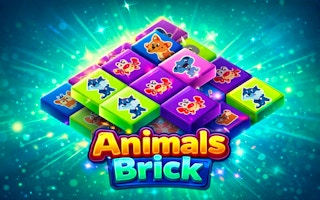
Animals Brick is a compact tile puzzle built around collecting three matching animal pictures. A selected tile moves from the board into the tray at the top. When the tray contains three of the same picture, that group clears and gives you room to continue. The important decision is not merely whether a tile can be clicked, but whether it contributes to a set you can finish soon.
The opening level has nine tiles and three animal designs. This gives you a small board on which to learn the complete matching cycle. Find three copies of one design, collect them carefully, and watch the tray after the third selection. In the first-level cow example, the three cow tiles disappeared from the tray and the coin balance rose from zero to five. A different animal already in the tray stayed there.
The tray has seven visible slots. That is enough room for several unfinished sets, but collecting unrelated pictures makes the next choice harder. Plan around complete triples rather than filling slots simply because tiles are available. This is a game for short, deliberate decisions: recognize a picture, locate its partners, and check the result before making the next selection.
Controls
Controls for Animals Brick
- Click or tap an animal tile
- Move the selected picture into the tray.
- Three matching tray pictures
- Clear that triple and free its slots.
- Helper icons
- Inspect the displayed purpose, coin cost, and current availability before use.
Useful strategy
Make your next move count
- Prefer finishing an existing pair when its third tile is visible.
- Compare complete pictures rather than color alone.
- Count unfinished designs after each clear.
- Keep room for the partners of pictures already selected.
Read pictures before positions
Begin by identifying the animal design on each visible tile. The opening board includes cows, a yellow star-shaped animal, and a pink-and-orange animal. Use the complete picture, including its face and shape, rather than treating every similarly colored tile as a match. When the board becomes busy, a brief visual comparison prevents a mistaken selection from occupying a valuable tray slot.
Locate the three copies of your first chosen design before clicking. You do not need a perfect plan for every later level to do this. On the opening board, a small nine-tile survey is enough to identify a complete set. If you can point to all three partners, collecting them consecutively creates a clear first result and leaves fewer different designs competing for your attention.
Board positions can become less useful after tiles animate away. A tile near the center may no longer be surrounded by the same neighbors once another has been selected. Track the animal picture rather than remembering only a rough coordinate. Before the third click, inspect the current board again so the pointer lands on the remaining partner rather than an empty space or a different animal.
Complete one triple cleanly
Choose the first cow, then wait until its movement into the tray is clear. Choose the second cow and inspect the two matching tray entries. Select the third visible cow to complete the group. The disappearance of those three entries is the useful result to watch for. A coin change is supporting feedback, while the freed tray space is what lets you continue the puzzle.
An animation can briefly make a tile's destination or click target confusing. Give each selection a moment to settle before deciding the next one. Rapid clicking is unnecessary for the opening lesson and can make it difficult to tell which animal entered the tray. If a click appears ineffective, look at both the board and the tray before trying again. The tile may be moving, or the pointer may have landed beside it.
After the triple clears, count the unfinished pictures still in the tray. In the opening example, a selected yellow animal remained after the cows vanished. That is a useful reminder that clearing one set does not clear every selected tile. Use the remaining picture to guide your next search: find its two partners, then finish that group rather than beginning an unrelated collection without a reason.
Use the seven slots as working space
A tray slot is temporary storage for an unfinished match. One tile of a design needs two more matching selections to clear; two tiles need one more. This simple distinction helps you prioritize. When you have two matching animals waiting and their third partner is visible, completing that set usually gives you more immediate room than adding the first tile of a different animal.
Consider a tray containing two cows, one yellow animal, and one pink animal. Selecting the third cow removes the whole cow group, reducing the number of occupied slots. Selecting another unrelated picture would add an unfinished obligation. You can compare these choices without knowing a hidden scoring formula: one finishes a set already close to completion, while the other asks you to find two additional partners later.
Do not assume that an almost-full tray is automatically a useful position. Count how many unfinished animal designs it contains and which have visible partners. Several single tiles can create more planning work than two nearly completed triples. The practical goal is to keep the board and tray connected: every stored picture should suggest a realistic next matching action, rather than becoming something you hope to resolve eventually.
Plan beyond the next click
Before choosing a new design, look for the partners you will need after the selection. This is especially helpful when tiles overlap visually or remaining pictures are harder to distinguish. Choose a clear, reachable picture and recheck the board after it moves. Do not assume a particular Mahjong-style side rule unless the current level demonstrates it; the relevant question is whether the tile you intend to select responds in this board.
You can make a small plan of three selections rather than mapping an entire level. Start with a design whose partners you can identify, collect that group, and survey the reduced board. This gives each short sequence a clear purpose. If a planned partner is no longer where you expected, pause and locate it again. Continuing from an outdated picture of the board is a common source of accidental tray clutter.
A complete group also simplifies the visual search. Once the cows are gone, you can spend your attention on the remaining animal designs. Use that reduction deliberately. Look for a waiting tray picture first, then scan the board for matching faces. Repeatedly surveying every tile from scratch is less efficient than using the tray to narrow the question you are trying to answer.
Coins and helper buttons
The opening board displays helper prices of 200, 200, and 100 coins beside shuffle, magnifier, and undo-style icons. Read the current label and balance before selecting a helper. The first observed triple awarded five coins, so an early match does not make those displayed helpers immediately affordable. Build a reliable matching habit before treating a helper as the solution to every uncertain choice.
The icons identify possible assistance, but their exact effect should come from the game's own current prompt. A shuffle symbol does not establish which tiles move, and a magnifier symbol alone does not explain whether it highlights one tile or an entire set. Inspect the explanation when available. Do not spend a resource on the assumption that an icon will produce a particular rescue sequence.
If you become stuck, diagnose the tray first. Which pictures are singles, which are pairs, and which have a partner on the board? That information tells you what kind of assistance would be useful. An undo-style tool might be relevant after a specific mistaken selection, while a rearrangement would address a different problem. The prices and availability shown in your current session should govern the decision.
Move from the opening lesson to later boards
The level-selection screen shows fifteen level slots, beginning with level 01. Treat the opening board as a place to learn the matching cycle and the interface. A clear first triple is a stronger foundation than clicking through menus without understanding how the tray responds. Later access and completion feedback should be read from the level screen rather than assumed from the number of visible slots.
On a new board, repeat the same short survey: identify the designs, find a promising complete set, and check the tray capacity. A familiar animal picture does not guarantee a familiar arrangement. Plan from the tiles currently in front of you. As the board changes, return to the unfinished tray sets instead of continuing a sequence remembered from another level.
If progress feels confusing, slow the rhythm to one selection followed by one check. Watch where the tile goes and what remains after a triple. This makes input mistakes, picture-recognition mistakes, and planning mistakes easier to distinguish. Once the sequence becomes clear, you can play more quickly while keeping the same habit of finishing sets and preserving working space.
Quick answers
Animals Brick FAQ
Do two identical animals clear?
The observed opening match cleared after three cows were collected. Plan for triples.
How many tray slots are visible?
The opening player shows seven slots. Check the tray while collecting unfinished sets.
Why is a tile still in the tray after a match?
Only the completed matching group clears. A different animal stays until its own triple is completed.
Game information
Game details
Play through the official GamePix publisher player. The external game may use cookies or display advertising under GamePix terms.
- Distributor and host
- GamePix
More about this game
Keep the break going